Where the reports are
On the Overview of the console, a line headed Reports links the latest weekly brief and the newest day’s daily digests, one link per server, with “more” when there are many. The Investigations list has every report as well: set Kind to “Daily digests” or “Weekly briefs”. On a report’s own page, Previous and Next buttons step to the report before or after it, for the same server or for the fleet.
By email, Settings, Notifications holds the card “What the organisation sends”, with two switches:
- The weekly email: “A summary in plain words when the weekly brief is written”.
- The daily sentence: “One sentence per server when the day’s digests are written”.
The card’s rule: “Off: nothing is sent, whatever anyone chose. On: each person’s own notifications decide whether they receive it.”
The daily digest
The agent writes one digest per server for each UTC day, after the day ends. The Models page words it: “Written once a day per server, as a batch. The weekly brief uses the investigation model.” A batch request is priced at the batch price, below the standard one, because nobody waits on it.
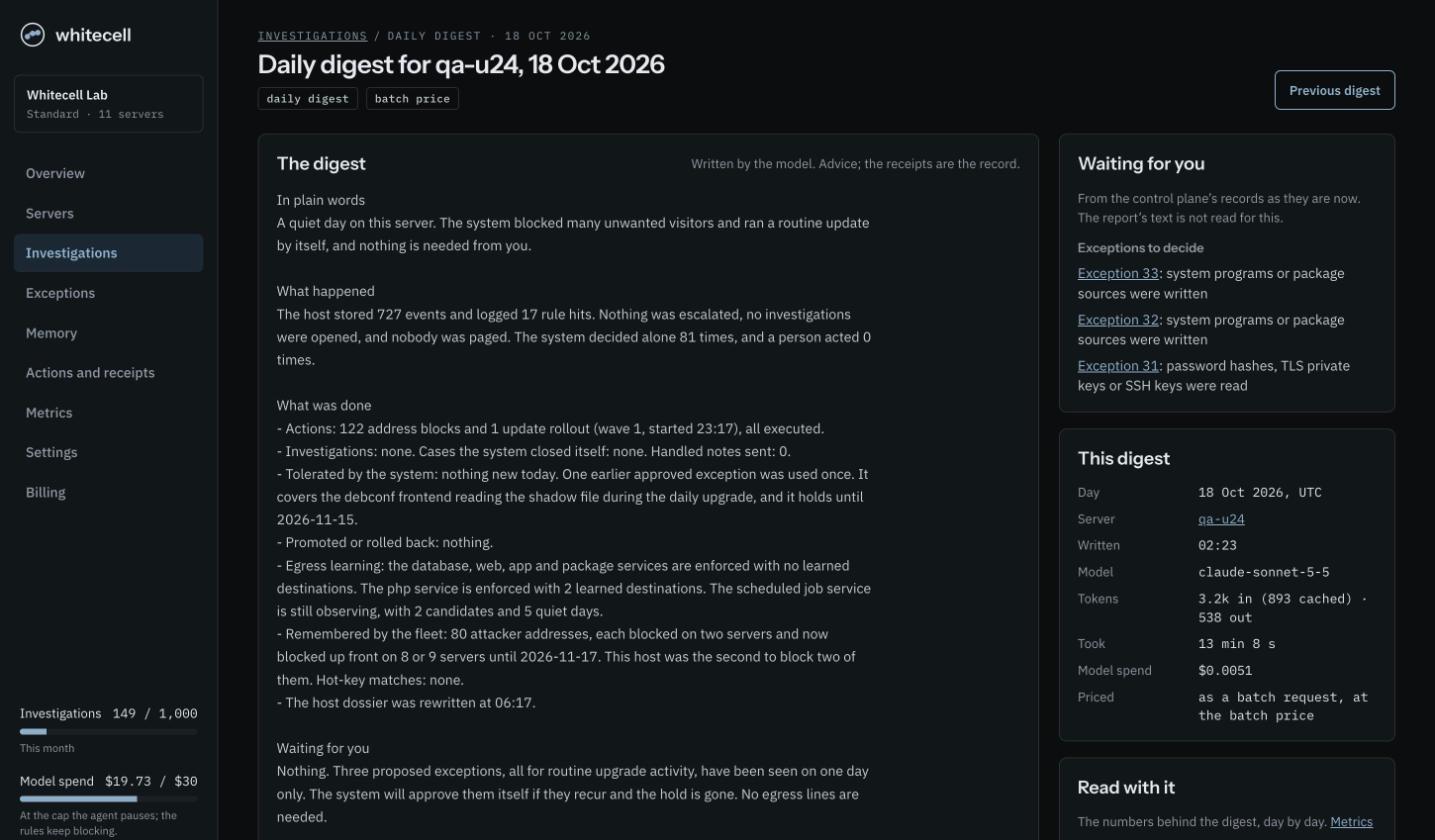
A digest has these parts:
- In plain words: at most three sentences for someone who runs the server and is not technical. Its first sentence is the daily sentence in the email.
- What happened: the day’s events and rule hits, what was escalated, whether anyone was paged, how often the system decided alone and how often a person acted.
- What was done: the actions, the investigations and the cases the system closed itself, what it tolerated, what it promoted or rolled back, how each service’s egress learning stands, what the fleet’s memory did on this server, and whether the server’s dossier was rewritten.
- Waiting for you: what needs a person, questions about destinations included.
- Spend: what the server’s model calls cost.
Above the text the page says: “Written by the model. Advice; the receipts are the record.” A digest tells you where to look. What actually happened is on Actions and receipts.
The This digest card gives the Day (UTC), the Server, when it was Written, the Model, the Tokens, how long it Took, the Model spend, and how it was Priced. The Read with it card links Metrics for the same server’s last 7 days: “The numbers behind the digest, day by day.”
The weekly brief
On Mondays the agent writes one brief for the whole fleet, from the week’s digests and the control plane’s counts.
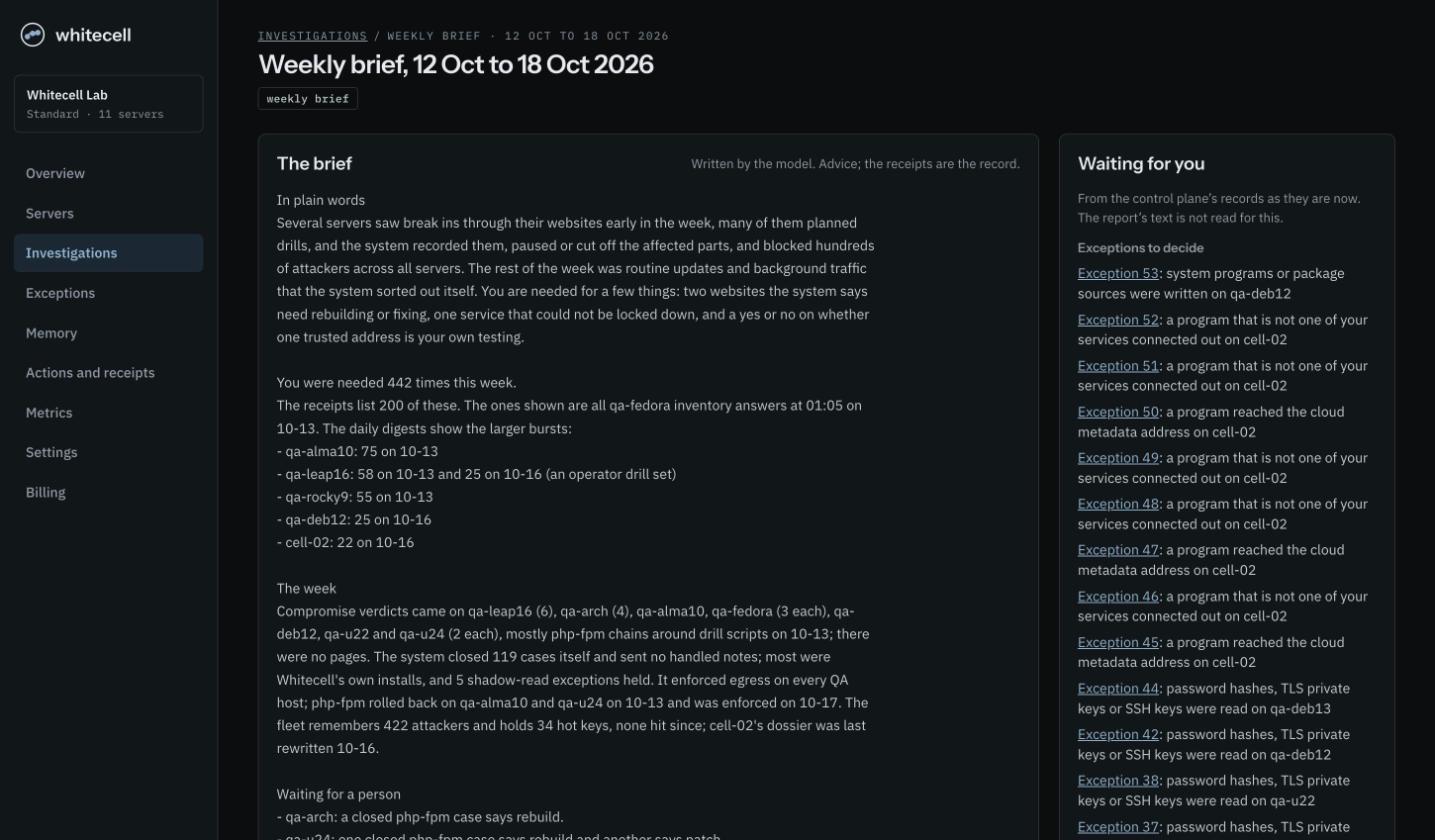
The brief opens with In plain words, then “You were needed N times this week.” That count comes from the receipts of what people did: approvals and declines, answers to questions, settings changed, cases resolved. The rest covers, per server, the week’s measurements, the cases the system closed, the exceptions in force and those only a person may approve, what the system promoted, the services whose promotion rolled back twice or more in 60 days, the attackers and patterns the fleet remembers, each server’s dossier, and the questions it could not answer, under “Questions I could not answer”. Its other headings are the model’s own, so they can differ from week to week.
Its Read with it card links Metrics for the fleet: “The fleet’s numbers for the week.” The weekly email carries the brief’s In plain words.
Waiting for you
Beside each digest and the brief, the Waiting for you card is not part of the model’s text. Its first line says so: “From the control plane’s records as they are now. The report’s text is not read for this.” When you open the page, it lists:
- Exceptions to decide, each linked to its case.
- Needs you: open questions and approvals, up to five, with the rest on the Overview.
- Ready to promote: services quiet long enough to move to enforce.
When nothing waits, it says “Nothing waits for you”. A digest written in the morning may name something you have answered since, or miss something that arrived later. Act on the card and on the Overview, which are current, and read the text for the account of the day.
Metrics
Metrics shows the numbers behind the reports: “Per UTC day, from the control plane’s own records: who was paged, what the model cost, what the rules caught, and what the agent looked at and concluded.” Choose Days (the last 7, 14, 30 or 90; 14 by default) and a Server, or All servers.
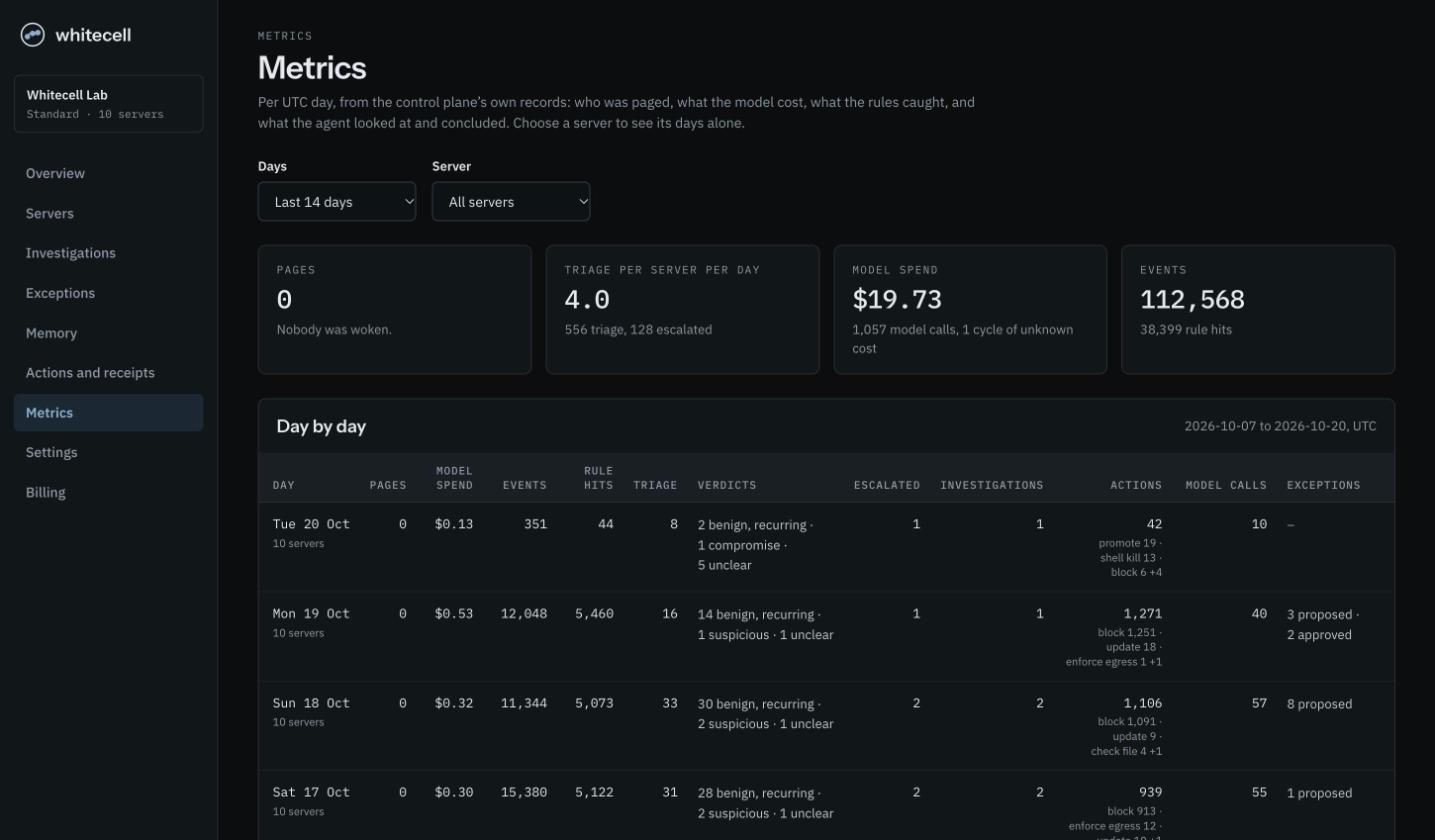
Four tiles sum the period: Pages (“Nobody was woken.” when there were none), Triage per server per day with how many escalated, Model spend with the number of model calls, and Events with the rule hits. The Day by day table has one row per UTC day, newest first, with the totals at the foot. The card “What the columns count” at the bottom of the page defines each column:
| Column | What it counts |
|---|---|
| Day | The UTC day, over every server unless one is chosen. It includes what belongs to no single server, such as the weekly brief and pages about spend, the model or the queue. Today counts up to now. |
| Pages | Needs that woke someone, each counted once a day: compromise, service down or fault. |
| Model spend | The estimated cost of that day’s model calls, exact to the micro-dollar. Cycles of unknown cost are counted, not priced. |
| Events | Events the servers sent and the control plane stored, by the hour each server stamped them. |
| Rule hits | Events where a rule of the rule pack fired. Hits at warn or alert are triggers for triage. |
| Triage | Triage created that day: one look by the triage model at a trigger, at most once per power of two of its daily count. |
| Verdicts | Of that day’s triage, those that finished, by verdict. Without a verdict: capped, refused or failed. |
| Escalated | Triage that asked for an investigation. |
| Investigations | Investigations created that day: the investigation model with the action catalogue. |
| Actions | Actions requested that day by the rules, the agent, people and the control plane, whatever became of them. |
| Model calls | Calls made for that day’s triage, investigations and reports. |
| Exceptions | Exceptions proposed that day, and exceptions approved that day. |
Pages, triage per server per day and model spend are the numbers that say whether the fleet is quiet. Because a recurring trigger is looked at once per power of two, a pattern that fires a thousand times a day costs about ten triage. When triage climbs, look for a recurring pattern that an exception could settle: an approved exception stops it creating triage at all.
Which model does which work
Settings, Models, says “Which model does each kind of work. Whatever the model, it can only ask for catalogue actions, through the same checks as everyone else.” It is one of the expert pages: if you asked for plain words, choose “Show all settings”.
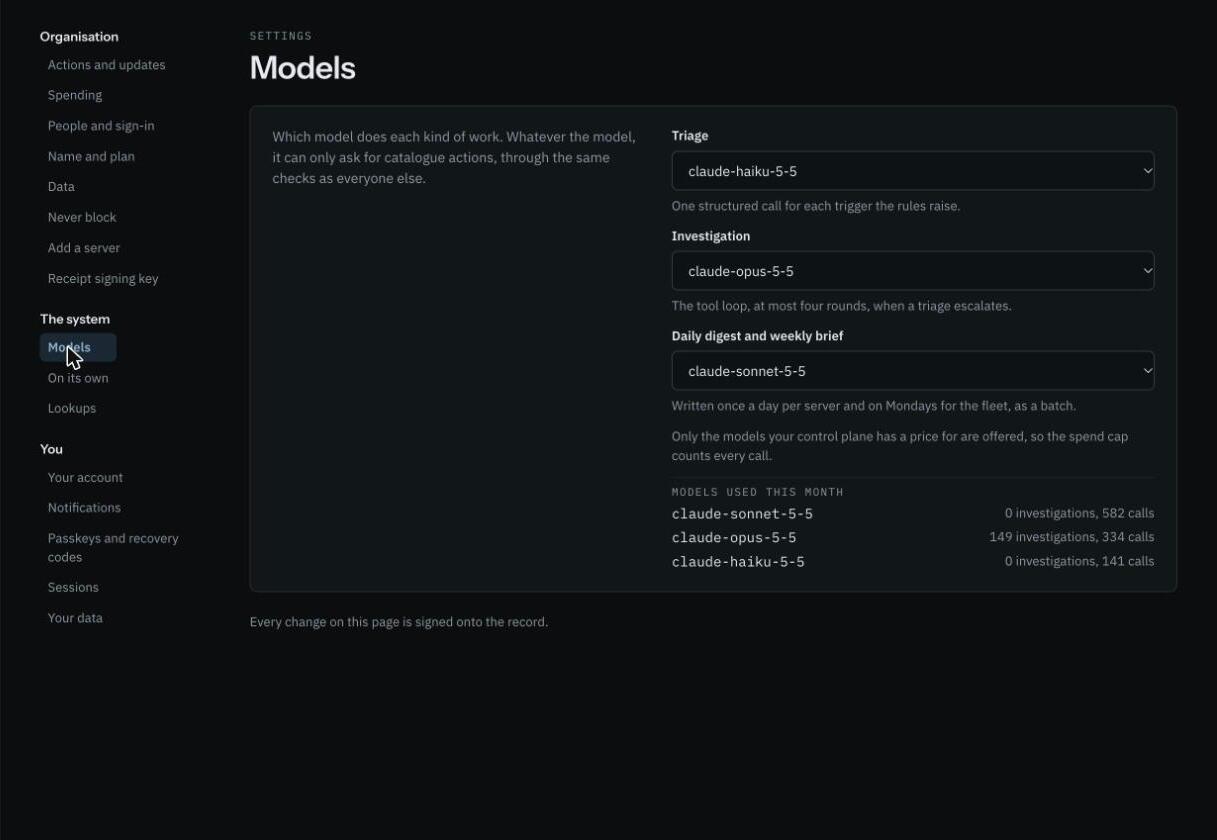
- Triage: “One structured call for each trigger the rules raise.” Claude Sonnet 5.5 by default.
- Investigation: “The tool loop, at most four rounds, when a triage escalates.” Claude Opus 5.5 by default.
- Daily digest and weekly brief: “Written once a day per server and on Mondays for the fleet, as a batch.” Claude Sonnet 5.5 by default. Each report’s card names the model that actually wrote it. Today the weekly brief is written by the Investigation model, as one ordinary request; the setting’s name is wider than what it does.
The one model call about a destination has a setting of its own, Claude Sonnet 5.5 by default, which this page does not show. “Only the models your control plane has a price for are offered, so the spend cap counts every call.” Models used this month lists each model with its investigations and calls.
The console shows what the model work costs where it happens:
- each row of the Investigations list and each case’s This investigation card: the model, rounds, tokens and cost;
- each report’s card: the Model spend and how it was Priced;
- Metrics: the model spend per day;
- Settings, Spending: the month’s estimated model spend against your cap.
All of these are the control plane’s estimates from the token counts and its own prices. It does not see the model provider’s invoice.
Related
- Read an investigation in two minutes
- Tell it what is normal, once
- What you pay, what the pool is, and what happens at a limit
- Every action, signed, and how to check it yourself
- The agent document in the repository: “The digest and the brief” and “Costs”. The models document: the spend cap.