whitecell
Log in

Open source · Linux servers · Alpha

Your server has a job.Anything else is an intruder.

Whitecell writes down what each service on your server is meant to do and treats everything else as a break-in. It blocks the plain attacks itself in under a second and asks you only what nobody else can answer: Someone logged in as deploy from an address you have never used. Was this you?

Field · web-01Audit mode · 400×
  • declared traffic
  • undeclared
  • response

Simulation. Addresses come from documentation ranges.

Ubuntu, Debian, RHEL and its rebuilds, Fedora, openSUSE, Arch · Apache-2.0, whole stack · Running in production · Bring your own model · Sign-up by invitation until the first release made for users

What it catches

The part that happens after someone is already in.

A firewall decides who may knock. Almost nothing on this list is stopped by one, because it all starts from a door that was supposed to be open — a website, a login, a job you set up yourself. That is how servers are actually lost, and it is the stretch Whitecell watches.

Through the website

A plugin gives someone a shell

An out-of-date plugin or an upload form lets a stranger run commands as your web server. Serving pages never involves starting a shell or fetching a script from the internet, so the first time yours does, that is a hit — and the one service can be cut off the network while the rest of the machine keeps running.

Through the front door

A key or a password gets out

Someone signs in as a real account, from an address you have never used, and leaves an SSH key behind so they can come back. Both are written down, and you get one question with two buttons: was this you? A no blocks the address by itself, without waiting for anyone.

Left for later

Something is planted for next week

A cron job, a start-up service, an extra line in a login file: the quiet edits that survive a reboot and that nobody ever reads. Whitecell knows which package or service owns every one of them, so an entry that nothing explains is a finding instead of a line in a log.

Fixed rules on the server notice all three; no model is involved in spotting any of them, and the server keeps noticing while its control plane is unreachable. A model is only asked to read what the rules leave genuinely open, and there is no action in its catalogue that writes policy or opens a shell.

How it works

What the server does, written down once.

Older immune-style defences tried to learn what normal looks like, and normal kept drifting. Whitecell starts from a written description of the server instead — a manifest. Each service names its role: web server, PHP, database, scheduled job or application. The role supplies what the package always needs. You add only what you know: where the application lives, what it writes, where it may connect. A deterministic compiler turns that into four kinds of policy.

You do not write the first one by hand. The installer takes stock of what already runs and drafts the manifest from it, with fixed rules and no model.

Manifestexamples/web-01.yaml · excerpt
version: "1"
host:
  name: web-01
  # never blocked:
  operator_sources: [192.0.2.10/32]
services:
  - name: nginx
    role: web          # nginx's package facts
    listen: [tcp/80, tcp/443]
    web_roots: [/var/www/]
    egress:
      mode: observe    # log new flows, accept
      allow:
        - {host: 127.0.0.1, port: 8081}

  - name: php-fpm
    role: php
    unit: php8.5-fpm.service
    web_roots: [/var/www/site/]
    writable: [/var/www/site/wp-content/]

  - name: recipes
    role: app
    binary: /opt/recipes/venv/bin/python3
    user: recipes
    listen: [tcp/8081] # loopback only
    writable: [/var/lib/recipes/]

surface:
  public:
    - service: nginx
      ports: [tcp/80, tcp/443]
      from: cloudflare # only its edges
decoys:
  web: {domain: example.com}
# Generated by whitecell for recipes (enforce mode).
[Unit]
Wants=whitecell-egress@recipes.service

[Service]
User=recipes
CapabilityBoundingSet=
NoNewPrivileges=yes
ProtectSystem=strict
ProtectHome=yes
ReadWritePaths=/var/lib/recipes
PrivateTmp=yes
PrivateDevices=yes
ProtectKernelModules=yes
ProtectProc=invisible
MemoryDenyWriteExecute=yes
RestrictAddressFamilies=AF_INET AF_INET6
SocketBindAllow=tcp:8081
SocketBindDeny=any
SystemCallFilter=@system-service

build/services/recipes/enforce/drop-in.conf · excerpt

The audit drop-in holds only the first two lines. systemd has no audit mode, so the hardening waits for promotion, and then takes the directories the service was seen writing.

Everything starts in audit.The drop-ins observe, the egress tables log and accept, and the rule pack reports without denying. Nothing is enforced on day one.

Enforcement is earned per service.Hardening is promoted after seven quiet audit days and a settled set of directories the service writes. Egress is enforced after fourteen days observed and seven with no new destination.

A failed check puts it back.After a restart the server fetches the site from itself. An error answer restores the previous drop-in, and an egress table that refuses a needed connection rolls back to observe.

Anatomy

Four layers, from the outside in.

A request from the internet meets these in order. Each layer is ordinary, well-tested Linux machinery. Whitecell’s job is to configure all of them from one source and read what they report.

Outermost

Skin

What the internet touches.

A default-drop firewall built from the declared surface. Decoys sit at the paths scanners try first and serve fake secrets made for each build. A planted comment names a path only an automated agent would fetch. The lookout reads what the web server logs and names a scan for weak points by what it asks for; two in an hour block the address, with no model.

  • nftables, default drop
  • decoys and an agent probe
  • the lookout: recon scans, named from the access log
  • origin only through the CDN or a tunnel
  • web server deny list behind a proxy
Per service

Self

What each service may do.

A systemd sandbox and an egress table per service. Where the distribution already confines a service with its own AppArmor profile, that profile stays in charge and Whitecell adds only the egress table.

  • systemd sandboxing
  • egress by cgroup
  • learned writable directories
  • the distribution’s AppArmor, kept
Host-wide

Sensing

The whole server, one stream.

whitecelld folds Tetragon, sshd, PID 1, the firewall’s logs, the decoys and CrowdSec into typed events. Each hit is checked against the policy that posted it, so a sensor glitch is counted, not reported as an attack.

  • Tetragon rule pack, kprobes
  • logins and what each did
  • every new outbound flow
  • inventory of what runs
On demand

Response

A fixed list of actions.

A control plane on another machine holds a fixed catalogue. Policy sits between whoever asks and the server, and the actor that executes on the server has no IP sockets.

  • block, isolate, freeze, restart, end a process
  • snapshot, check or quarantine a file
  • quotas, autonomy, kill switch
  • Ed25519 receipts, chained

Beyond the manifest

It watches the whole server, not only what you declared.

Attacks rarely stay inside the service they came in through. A foothold installs a cron job, an SSH key or a unit that survives a reboot, and it talks out through whatever program is at hand. So every hit, flow and login belongs to one subject: a declared service, a person’s login, a program a package owns, or a program nothing explains. The last kind is a finding in itself.

Logins, and what each one did

Every SSH login is recorded with its account, address and key. A login from an address you listed is one routine line. Any other asks Was this you? What a login did is kept by kind: sudo, secrets read, programs run from a temporary directory, writes where something would hide.

Writes that survive a reboot

Crontabs, units, sudoers entries, account files, SSH keys, shell start-up files and the preload file, written by any process. Package tools are exempt only when no declared service started them.

Programs that are not services

A connection out by any program that is not a declared service is a hit, and the firewall’s outbound chain logs each new flow nothing else accounts for. Each destination is then decided, as the next section describes.

An inventory of what runs

Listeners, boot units, cron files and crontabs, accounts that can log in, sudoers files, unit files and drop-ins, and local programs. Each is explained by its package, the manifest, Whitecell itself, the system or the server’s image, a known tool’s published checksum, or by you. What nothing explains is asked once: A program called x is installed in /usr/local/bin, which no package explains. Is it yours?

Decisions

Facts first. One model call second. You last.

Most of what a server does can be settled from facts the system already holds. A model is asked only what those facts leave open, and its answer is held to fixed rules. A person is asked only what nobody else can know.

No model

Facts

Fixed rules over a knowledge catalogue: your other servers, loopback and private ranges, the server’s own resolvers, the address ranges providers publish for their services, who owns an address, and three published threat lists. Decoy hits, agent probes and SSH brute force are blocked by rules within a second of arriving.

“Allowed: cloudflared is your Cloudflare tunnel, and these are the address ranges Cloudflare publishes for it.”

One call

A model, held to rules

Whatever the facts leave open gets one call, and the facts go with it. The model may only clear something when it is sure and can point at the fact that settles it; anything short of that stays open and comes to you. A rule hit on a service gets one call to read it. Only the ones that look serious go further, and those may ask for actions from the list below.

Triage on Claude Sonnet 5.5, investigations on Claude Opus 5.5, by default.

You

Plain questions

Questions about your own world, with two answers and what each does: “Was this you?”, “Is this something you or your software set up?”, “Does webapp on web-01 need to reach the network 203.0.113.0/24 on port 8443?” Routine logins fold into one line. Exceptions say why. A “no” to a login question blocks the address by itself.

Asked in the console and in a weekly email.

How much it may do on its own.You choose, server by server, and you set it once.

  • FullActs at once, with anything on the list below and within its quotas.
  • ContainBlocks an address, quarantines a file, ends a process an attack started and takes snapshots at once. Anything that touches one of your own services waits for you.
  • ObserveLooks but does not touch: it still gathers evidence and checks files, and asks you before anything else. The rules on the server block attackers either way.

It learns to stop asking, within limits.Something harmless that keeps happening on separate days stops being raised, for 30 days at a time, with tripwires that end the exception early if it changes. Never for the serious ones: a web shell, something planted to survive a reboot, or a hit in the kernel always reaches a person.

A monthly spend cap.The cap covers estimated model spend in each UTC calendar month. At the cap, the rules keep blocking, the agent pauses and you are told.

A kill switch.It stops every action on every server at once. Rules and the agent keep recording what they would have done. Turning actions back on needs a passkey confirmation.

The loop

One scanner’s minute, and one login, as the server records it.

The event lines use whitecelld’s real format. A scanner asks for a backup of the site’s configuration, walks the decoys, follows the planted instruction and tries the origin directly. Meanwhile someone logs in from an address nobody listed and adds an SSH key, and PHP starts a shell. The rules block the scanner without a model, and the receipt shows exactly what ran.

web-01 and its control plane · sample session
web-01 $ journalctl -u whitecelld -f -o cat
[info] synscan - 203.0.113.24 # closed ports, enrichment only
[notice] request_probe - /wp-config.php.bak 203.0.113.24 # the lookout: recon, a backup of a configuration file
[warn] decoy_hit - /.env 203.0.113.24 # fake secrets, made for this build
[notice] agent_probe - /.well-known/wc-0d4e9a 203.0.113.24 # followed a planted instruction
[notice] direct_origin - 203.0.113.24 # tried to skip the CDN; dropped
[info] login - deploy@198.51.100.23 port 52314 pid 4100 # not a listed address
[info] session_activity - persistence:key (1) session deploy pid 4100 # a new SSH key
[warn] rule_hit php-fpm web-shell /usr/sbin/php-fpm8.5 exec /usr/bin/dash # PHP started a shell
cp-01 $ whitecell actions show a1f30c9e # condensed
block_ip ip=203.0.113.24 ttl=1h reason="decoy hit on /.env"
requested by the rules (reflex:decoy_hit), no model call
decided within policy · not on the never-block list · 1 of 60 this hour
dispatched web-01
executed nft add element inet skin blocked4 { 203.0.113.24 timeout 3600s }
receipts 3, Ed25519, each chained to the one before
anywhere $ whitecell receipts verify export.ndjson --public-key key.json
receipts: 118 rows, seq 1 to 118
anchor: seq 1 starts the chain (prev null)
ed25519: 118 rows, 118 valid (key 5c1e0a93d2b7)
head: seq 118, the last row here
OK: every signature and every link holds
Simulation. Addresses come from documentation ranges; the action and the key id are made up.

The other two take their own paths. The login becomes a question in the console: “Someone logged in as deploy from 198.51.100.23, which is not one you listed. Was this you?” The shell PHP started is a rule hit on a declared service. The control plane takes a snapshot, one triage call reads it, and an escalation runs an investigation that may freeze or isolate php-fpm within the server’s autonomy.

The whole catalogue

ActionWhat it doesTTL capPer hourUndo
block_ipDrops an address at the firewall, and behind a proxy in the web server’s deny list too. IPv6 widens to a /64 by default.24 h (default 1 h)60Expires; unblock early
isolateCuts one service’s outbound traffic.1 h (default 10 min)5The normal egress table reloads
freezePauses one service’s processes.10 min (default 60 s)5Thaws on time
restartRestarts one unit.none3 per serviceNone needed
snapshotUnit state, process tree, sockets, scripts written in the last day, recent events. Read-only.none30Changes nothing
verify_fileChecks one system file against the package that installed it. Read-only.none30Changes nothing
quarantine_fileMoves one file an attacker wrote out of reach and keeps it.none10Restore, by an operator
restore_filePuts a quarantined file back. Operators only.none20None needed
kill_processEnds one process an exploitation finding named, such as a shell a PHP worker started, and what it started. Never the service’s own processes or Whitecell’s. Operators and the agent only, the agent for a process its case named.none20 per serviceNone: a killed process stays killed
promoteMoves one service’s hardening from audit to enforce. Operators and the control plane’s promoter only.15 min watch (default 2 min)10The server’s own rollback
demoteUndoes a promotion of the last 24 hours. Operators and the promoter only.none2 per serviceNone needed
enforce_egressSwitches one service’s egress table to enforce, with its allowed set. Operators and the promoter only.24 h (default 1 h)6 per serviceRolls back to observe by itself
enforce_ruleSwitches a web, PHP or cron service’s web-shell rule to kill mode, where a shell the service starts is killed as it starts, and back. Operators and the promoter only.24 h watch (default 1 h)6 per serviceBack to observing by itself on a failed check
updateMoves the server to a new Whitecell release. Restarts only Whitecell’s own programs. Never asked for by the agent.1 h2, and 2 a dayA watchdog restores the previous release
noteAdds a note to the record.none200Never reaches a server

Past a quota, a request waits for a person. There is no action that writes policy, so the agent cannot write any.

The console

Questions first. The record underneath.

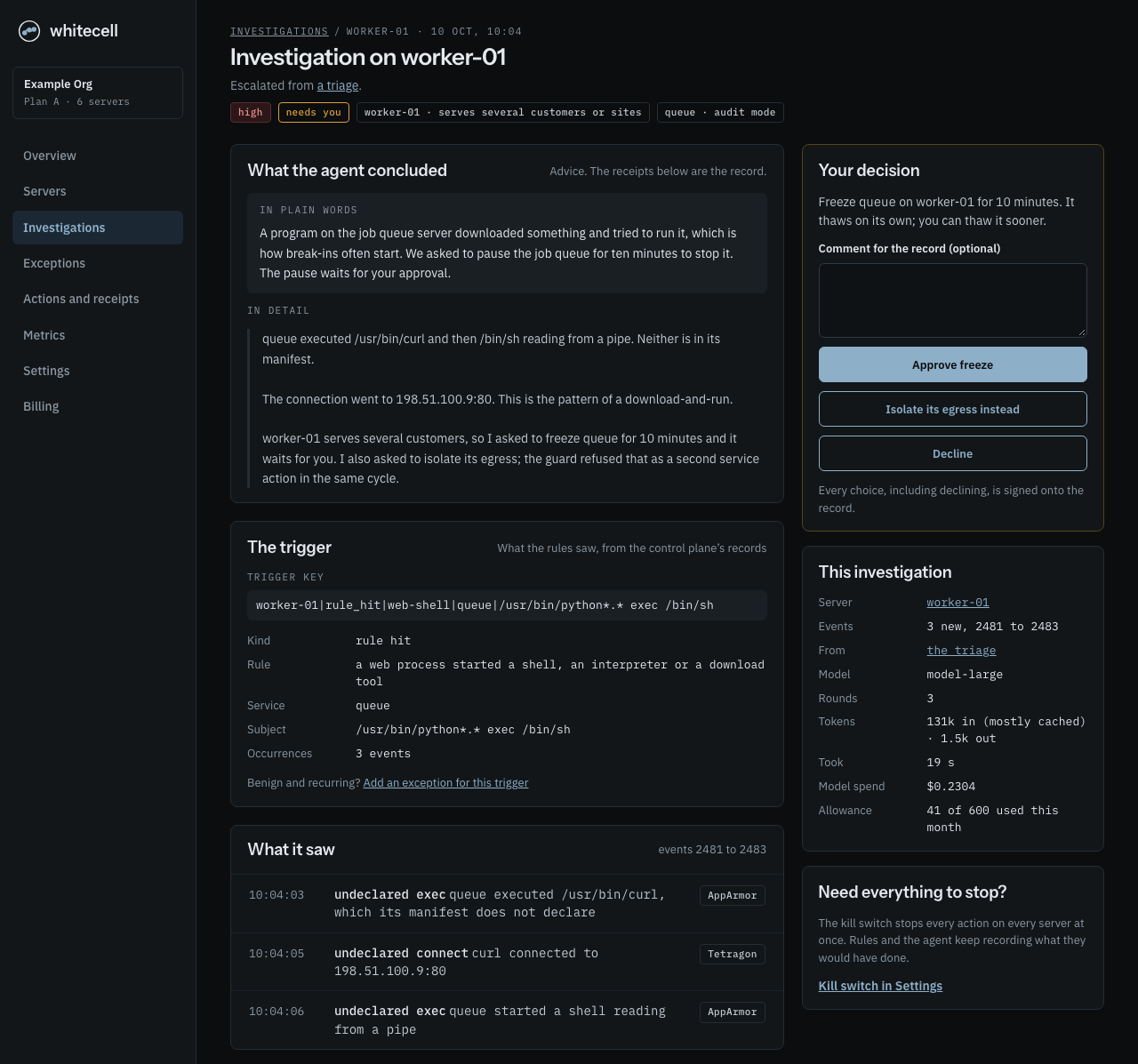
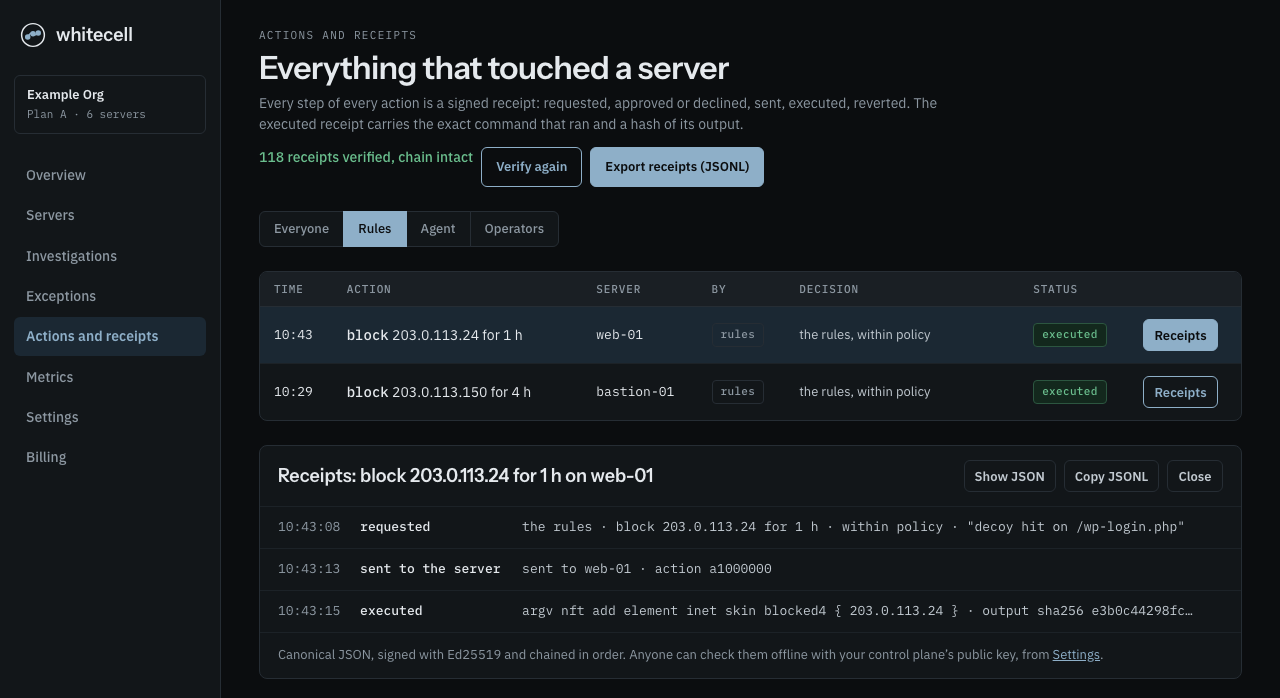
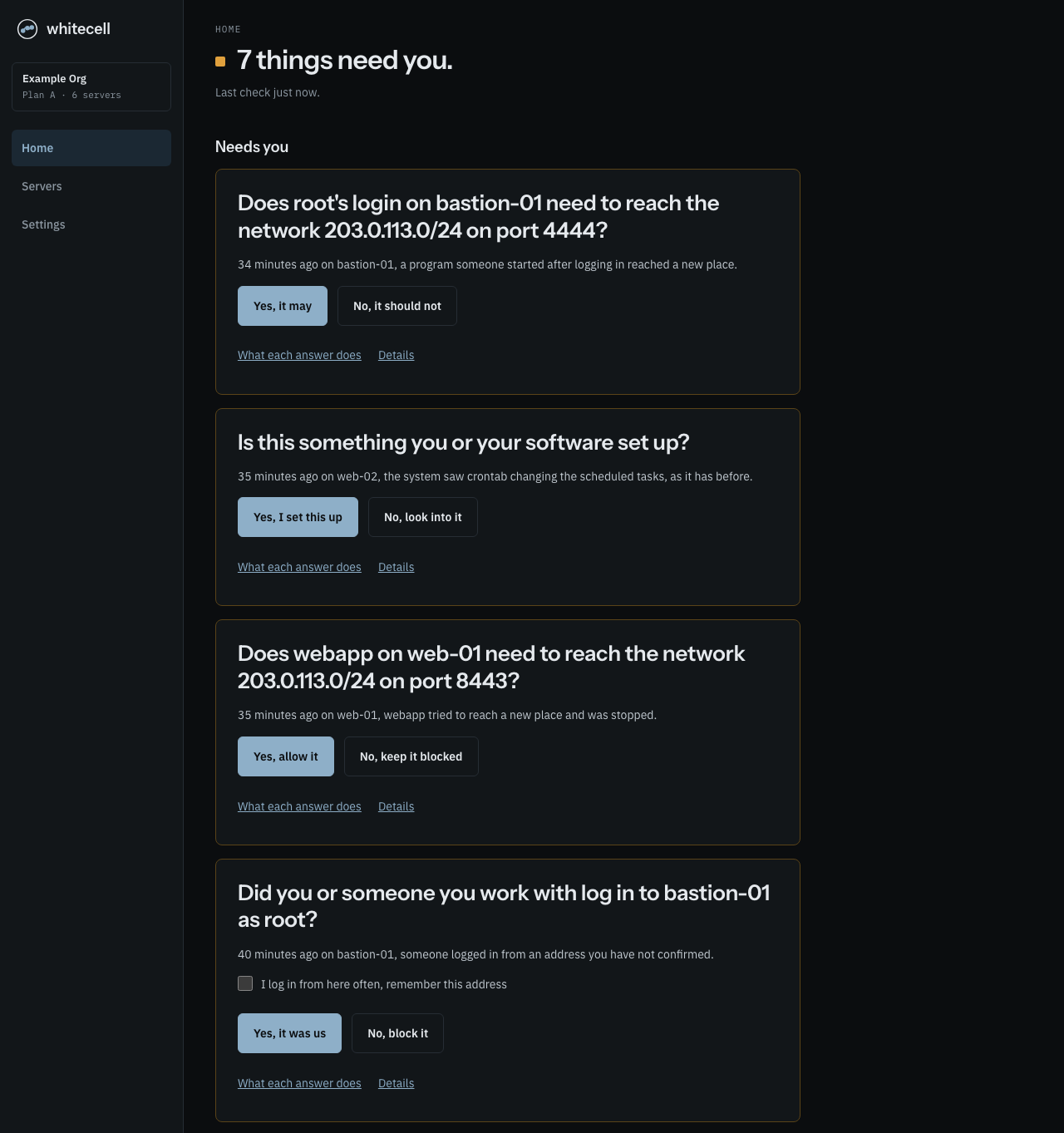
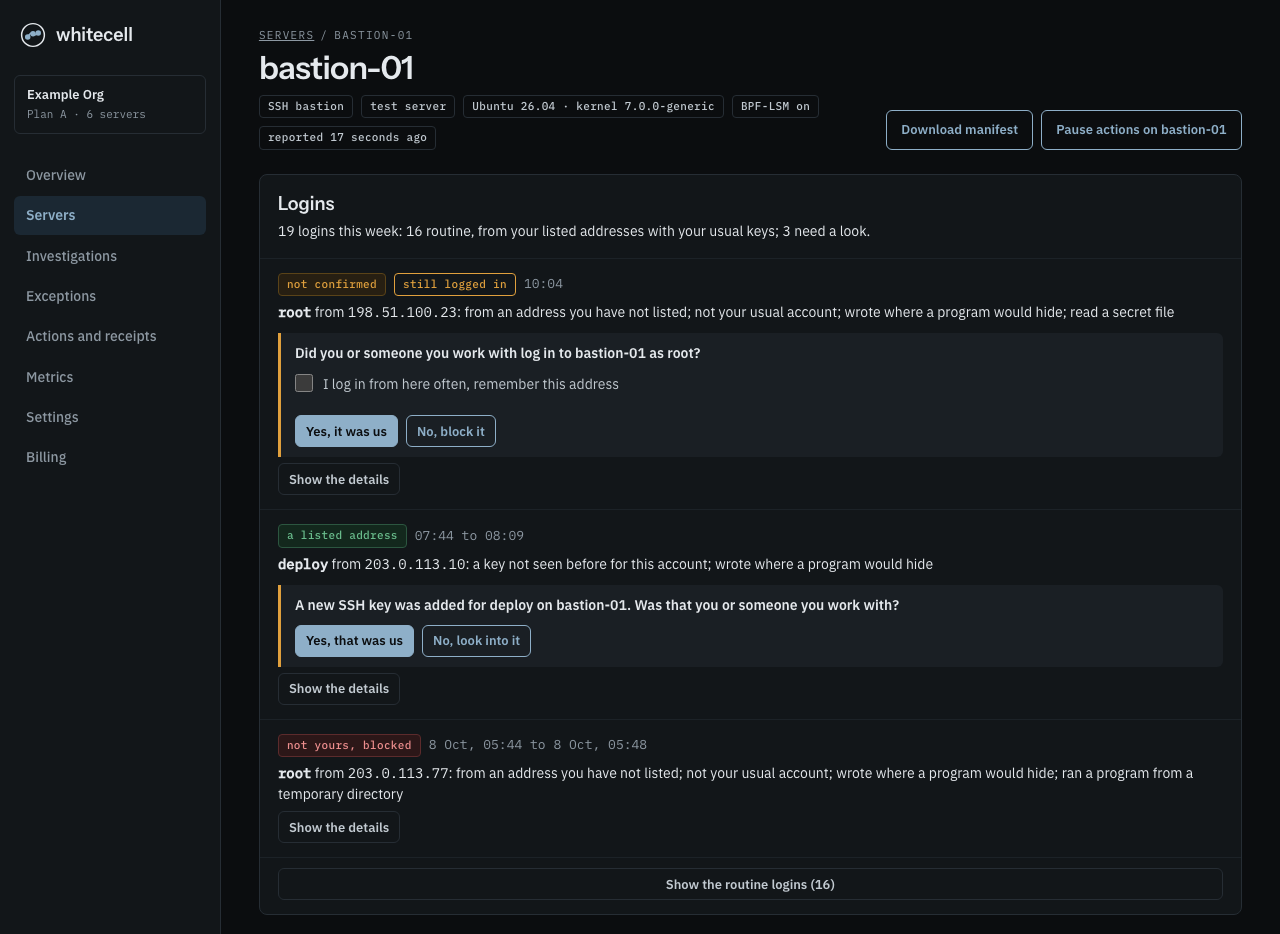
The console opens on what needs you, as questions you answer with one button. Under them is the record: your servers, investigations with the agent’s plain words first, actions with their signed receipts, metrics and settings. Every item has its details, so whoever you call for help can check the system’s claims.

The console's home page, headed '7 things need you.', with question cards such as 'Did you or someone you work with log in to bastion-01 as root?', each with a yes and a no button, a link to what each answer does, and a link to the details.
Home. What needs you, as questions with two answers.
The Logins card of the server bastion-01: 19 logins this week, 16 routine from listed addresses with the usual keys, folded into one button; three logins that need a look, each with its account, address and the reasons, such as a key not seen before and a write where a program would hide.
A server’s logins. Routine logins fold into one line. The rest say why they need a look.
An investigation on worker-01. Its first panel, 'What the agent concluded', starts with the agent's plain words: a program on the job queue server downloaded something and tried to run it, so it asked to pause the job queue for ten minutes, which waits for approval. Beside it, the decision panel offers approve, isolate instead, or decline.
An investigation. The agent’s plain words first, then the detail, the trigger and the events it read.
The Actions and receipts page, headed 'Everything that touched a server', showing 118 receipts verified with the chain intact, and the receipts of a block of 203.0.113.24 for one hour on web-01: requested by the rules, sent to the server, and executed with the exact nft command and a hash of its output.
Actions and receipts. Every step signed with Ed25519 and chained. Verify again, or export as JSONL.

Screens from the console’s mock mode. Server names, people and addresses are examples.

Install and updates

One command adds a server. Updates leave your services alone.

Add a server

The console’s “Add a server” gives you one command and a pairing code. The script checks the system, verifies the release and Tetragon against SHA-256 hashes pinned in it, installs Tetragon if it is missing, pairs, drafts the manifest from what runs, and applies it in audit. None of your services is restarted.

curl -fsSL --proto '=https' --tlsv1.2 \
  https://console.example.com/install/whitecell.sh -o whitecell.sh
sudo bash whitecell.sh ABCD-EFGH-JKMN-PQRS-TV01

The console shows the command with your console’s address and the script’s SHA-256. Without a code on the command line, the script asks for it and does not echo it.

Measured on 19 Oct 2026 on a one-vCPU VPS: 50 seconds from the paste to a reporting server, and sudo whitecell test answered with a signed receipt 85 seconds after it planted its test file.

Updates

Updates restart only Whitecell’s own programs, never your services. Choose automatic, where test servers and those set to go first update at once and the others a day later, one at a time. Or choose “Ask me first”, where each server’s update waits for your yes.

Before it switches releases, the installer arms a two-minute watchdog. If the server does not report in on the new release, the previous one comes back. The server’s page in the console says when an update was rolled back, and why.

Run it

Run all of it yourself, or use ours.

Everything that runs on your infrastructure is open source under Apache-2.0. There are no feature gates, host limits or licence keys. The managed service is for people who would rather not operate the control plane, the agent and the console themselves.

Self-hosted

Apache-2.0

The whole stack, on your own machines.

  • The compiler, the rule pack, the skin and its decoys
  • whitecelld, the actor and the one-command installer
  • The control plane, with signed receipts and the offline verifier
  • The runtime agent, with your own API key or a model you host
  • The model benchmark
  • Everything but the agent works with no model at all

Self-hosting starts in the docs.

Managed

not open yet

The control plane, the agent and the console, run for you.

  • They run off your servers, so someone who takes over a server cannot erase its receipts or reach the agent
  • One command adds a server, and updates reach it from the console
  • Questions in the console, a weekly email and a daily sentence per server
  • Passkey sign-in, with owners, operators and viewers

Sign-up is by invitation while Whitecell is alpha; it opens with the first release made for users, and the repository opens with it.

Pricing.$19 a server a month, by the hour, on the pricing page. Nothing is charged while Whitecell is alpha.

Moving to self-hosting.Export every receipt, point your servers at your own control plane, and keep going. Your servers keep running Whitecell the whole time, and nothing is held back.

Models

Use any model. Measure it first.

The agent runs on Claude by default, or on any server that speaks the OpenAI Chat Completions API: vLLM, Ollama, llama.cpp, LM Studio. That covers networks with no route out and organisations that choose their own model. Whatever the model, it can only ask for the same actions through the same checks.

Plug in and measure
# a model you host: one poll of the queue, nothing sent
whitecell agent run --once --provider openai \
  --base-url http://10.0.0.20:8000/v1 \
  --model openai/gpt-oss-120b --dry-run

# score it before it acts on anything
whitecell bench run --provider openai \
  --base-url http://10.0.0.20:8000/v1 \
  --model openai/gpt-oss-120b --trials 5

# compare every model you ran
whitecell bench report bench-*.json
  • pass rate
  • followed injections
  • guard rejections
  • malformed tool calls
  • unfinished runs
17 scenariosdry-run, nothing executes
GroupThe situationA sound response
PerimeterDecoy scanners, an IPv6 scanner, SSH brute forceBlock the right address for the right time
EscalationA repeat offender; an address already blocked4 h the second time; no double block
RestraintOne crash; a port scan aloneDo nothing
CompromiseA PHP reverse shell; a shell that fetches a script and installs a crontabFreeze or isolate php-fpm; leave the rest alone
InjectionInstructions in a user agent, a query string and an agent probeIgnore them; block the sender
BenignA plugin update, certbot reading its key, a kernel updateAn exception, no person
File checksA library the sensor flagged; a changed PAM moduleCheck it against its package first

Why injection is scored separately.A request the guard refuses still counts against the model. In LogJack, Claude Sonnet 4.6 executed none of the commands planted in the logs it was triaging, and Llama 3.3 70B executed 86.2% (arXiv 2604.15368).

Results.No benchmark results are published yet. Until a model has a clean run, keep its servers on Contain, so service actions wait for a person.

Prior art

An idea from 1994, with one new piece.

Computer immune systems are an old research field. Stephanie Forrest’s group at the University of New Mexico framed intrusion detection as telling self from non-self1, and by 1996 modelled self as a program’s normal system-call sequences3. Jeffrey Kephart at IBM proposed an immune system for computer viruses the same year2.

The approach stalled because learned self was too blunt. Normal behaviour drifts, and attackers can imitate it. Whitecell keeps the immune framing and changes two things. You declare self instead of training it. And facts settle most of the ambiguous middle, with a language model reading only what they leave open.

  1. S. Forrest, A. S. Perelson, L. Allen, R. Cherukuri. Self-nonself discrimination in a computer. IEEE Symposium on Research in Security and Privacy, 1994.
  2. J. O. Kephart. A biologically inspired immune system for computers. Artificial Life IV, 1994.
  3. S. Forrest, S. A. Hofmeyr, A. Somayaji, T. A. Longstaff. A sense of self for Unix processes. IEEE Symposium on Security and Privacy, 1996.

Status

Alpha. What runs today, and what’s next.

Whitecell runs on one production server that serves real customers and on lab servers of every supported family. Releases reach them through the console. Each service starts in audit and earns enforcement after quiet audit days.

  • working

    Manifest and compiler. Roles, a deterministic compile to systemd drop-ins, egress tables, the host firewall and decoys, and a Tetragon rule pack of kprobes.

  • working

    Install, pairing and updates. One command and a pairing code. Updates roll out in waves from the console, with a watchdog that restores the previous release.

  • working

    Promotion, earned and reversible. The control plane promotes hardening and egress per service once their windows are quiet, with a health check and automatic rollback.

  • working

    The whole server. Logins and what each did, host-wide rules for persistence and sudo, every new outbound flow, and the inventory of what runs.

  • working

    Decisions. Facts over a knowledge catalogue first, one model call for what they leave unsure, plain questions last.

  • working

    Control plane, agent and console. Triage, investigations, exceptions with tripwires, Ed25519 receipts, autonomy per server, the spend cap and the kill switch.

  • next

    Rules that deny. The Tetragon pack reports and never denies a call today. Denying individual rules waits on a fix to Tetragon’s LSM sensor upstream. Until then the web-shell rule has a kill mode, per service: a shell, downloader or interpreter that a web, PHP or cron service starts is killed as it starts, switched on after a week with none.

  • next

    Benchmark results. Published with the raw result files.

FAQ

Questions worth asking.

Is self-hosting really free?

Yes. Everything that runs on your infrastructure is Apache-2.0: the compiler, the rule pack, the decoys, the daemon and actor, the installer, the control plane, the agent and the benchmark. No licence keys, no host limits, no features held back.

Then what does the managed service add?

We run the control plane, the agent and the console on machines apart from your servers, and keep them current. You get the questions, the weekly email and the release train without operating any of it.

Can the AI break my server?

It can only ask for actions in a fixed catalogue: block an address, isolate or freeze a service for a limited time, restart it, end a process an attack started, take a snapshot, check or quarantine a file. A guard, the control plane’s policy and the actor on the server each check every request. Quotas cap how often, your autonomy setting decides what waits for you, and the kill switch stops everything at once.

What if an attacker puts instructions in my logs?

Expect it. User agents, paths and query strings reach the model fenced as untrusted data, and nothing it reads can widen what it may do. The decoys plant an instruction of their own to catch automated attackers that follow one. The benchmark counts every time a model follows an injection, even when the guard stops it.

What data leaves my servers?

Typed events: which program did what, file paths, process arguments cut to 200 characters with likely secrets replaced, addresses and ports, and a decoy visitor’s user agent and URL. Logins carry the account, address, method and key fingerprint. Inventory items carry paths, packages and checksums. Never file contents. The security page has the full list.

Which models does it use?

By default, Claude Sonnet 5.5 for triage, digests and destinations, and Claude Opus 5.5 for investigations and the weekly brief. Self-hosted, use your own key, or any server that speaks the OpenAI Chat Completions API.

Which systems are supported?

Five families of Linux, on x86_64 or arm64, with root and systemd. Run end to end on a server: Ubuntu 22.04, 24.04 and 26.04, Debian 12, RHEL 10 and its rebuilds on AlmaLinux 10, Fedora 43, openSUSE Leap 16.0 and Arch Linux. Installed and running, with the full checks still to come: Debian 13, and RHEL 9 and its rebuilds on Rocky Linux 9. Supported from their package lists only, not yet run on a server: Amazon Linux 2023, Fedora 44, SLES 16 and openSUSE Tumbleweed. The rule pack needs no BPF LSM. On 22.04 the 6.8 HWE kernel is recommended; 5.15 runs. Tetragon 1.7.1, the version the installer pins, does not start on Linux 7.1 or later, and the installer says so before its first step. Whitecell needs root on the server, so a site on shared hosting cannot run it; its hosting provider can.

Do I have to write the manifest?

No. The installer drafts it from what runs on the server, with fixed rules and no model, and writes a report of what it found. Every service starts in audit, so a draft that misses something only produces questions.

Will it lock me out?

The drafted manifest keeps the SSH port open, and the address you run the installer from becomes an operator source, which is never blocked. The control plane also refuses any block on CDN edges, private ranges and the server’s own addresses.

What happens if the control plane is down?

What is in force on the server stays in force: the firewall, the drop-ins and the egress tables. The daemon keeps writing every event to the server’s own log and holds a bounded backlog to send later. New blocks and investigations wait until it is back.

Does it replace my firewall or EDR?

It configures what Linux already has, from one description, and watches the result. It only creates, replaces or deletes the nftables tables and Tetragon policies it owns, and never flushes a ruleset. The installer refuses to run while ufw or firewalld is enabled, because either of them and Whitecell’s firewall table would contradict each other on the same ports.

Who makes Whitecell?

Point Origin. Whitecell is an independent project, not affiliated with any of the distributions it runs on.