Actions and receipts
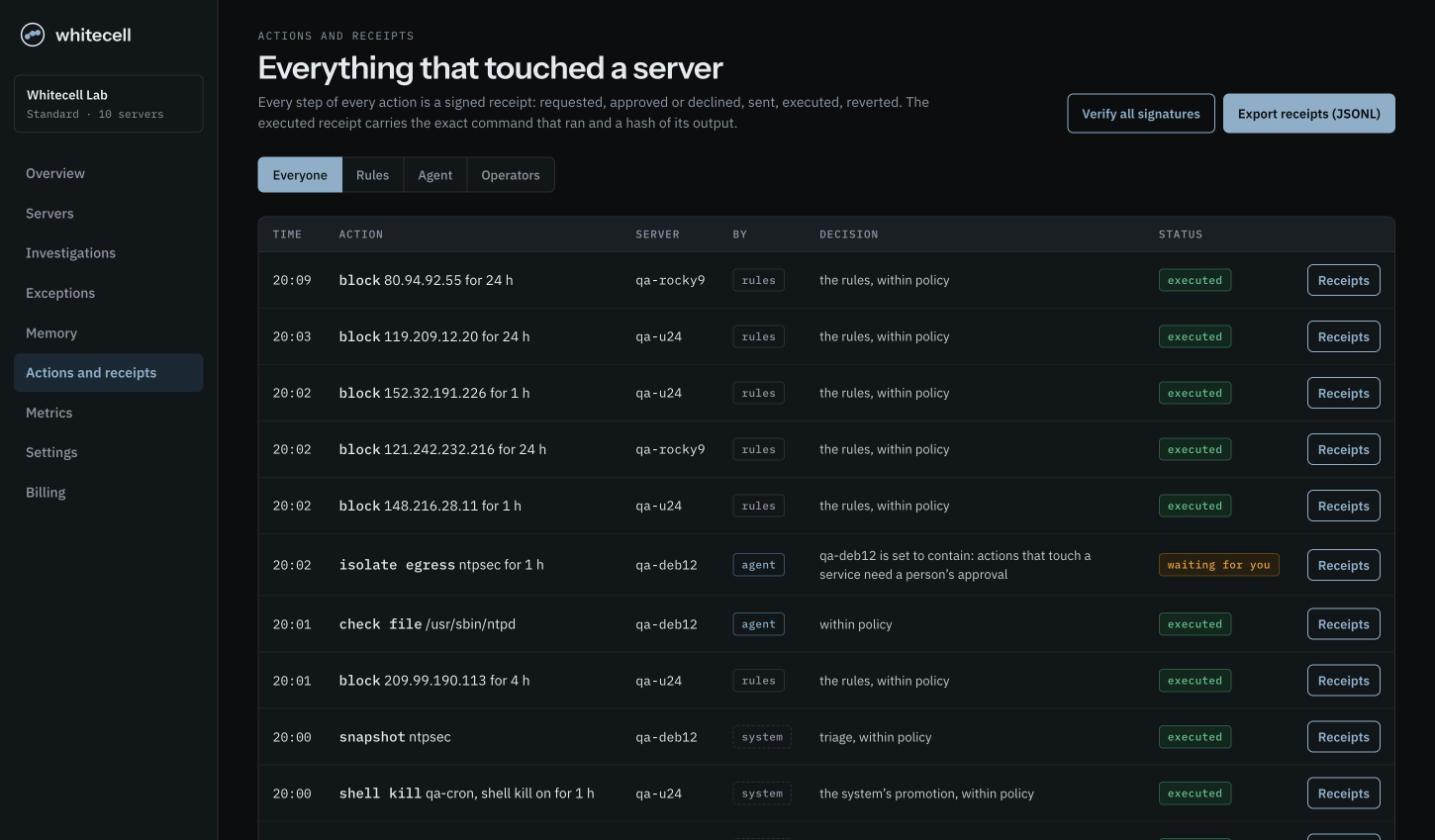
Open Actions and receipts in the console’s sidebar, or from the button on the Overview. The page is headed “Everything that touched a server”, and says: “Every step of every action is a signed receipt: requested, approved or declined, sent, executed, reverted. The executed receipt carries the exact command that ran and a hash of its output.”
The table has one row per action, newest first:
- Time and Action: the verb and its target, as “block 198.51.100.7 for 24 h” or “isolate egress php-fpm for 1 h”.
- Server.
- By: rules, agent, operator or system. The rules block plain attacks without a model. The system is the control plane itself: a triage’s snapshot, a promotion.
- Decision: the policy’s answer in words, such as “the rules, within policy”, or “web-01 is set to contain: actions that touch a service need a person’s approval”.
- Status: executed, waiting for you, sent, queued, recorded, denied, failed, refused by the server, reverted, revert failed, confirmed, declined, revoked or expired.
“Everyone”, “Rules”, “Agent” and “Operators” above the table filter it by who acted. Below it, “Changes to settings and servers” lists the receipts that are not actions: settings with their old and new value, never-block entries, new and paused servers, autonomy, exceptions.
The catalogue
These are the only things that can happen to a server. Block an address, for up to 24 hours (1 hour by default), and unblock it. Isolate a service’s egress for up to an hour, so its undeclared outbound traffic is dropped and declared traffic keeps working, and release it. Freeze (pause) a service for up to 10 minutes, and thaw it. Restart a service, at most three times an hour for each service. End a program that an exploitation finding named, with what it started, never the service’s own processes. Take a snapshot, or check a file against the package that installed it; both are read-only. Quarantine a file, and restore it. Beside those come the system’s own steps: promote a service from audit to enforce and demote it, enforce its egress, and switch its shell kill on or off. These carry the server’s own health check and rollback, and only a person or the system’s promotion may ask for them, never the agent. An update is asked for only by a person or the update rollout. A note never reaches a server. No model writes a policy file or a firewall rule, and none opens a shell.
Every request passes the same policy, in order: the catalogue’s own checks, who may ask for it, the kill switch, never-block for a block, the hourly quota, and the server’s autonomy. The server checks each action again itself, with its own quotas.
The phases of a receipt
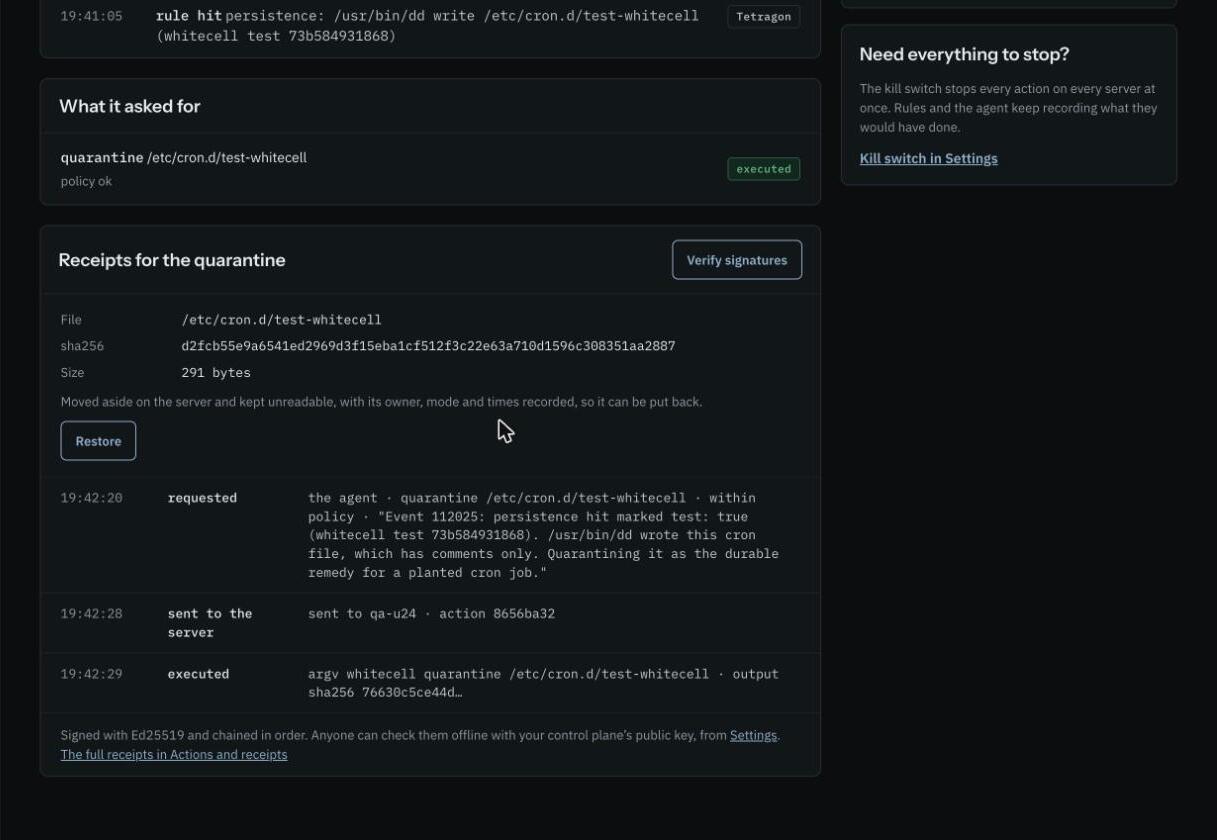
Choose “Receipts” on a row. The panel lists that action’s receipts, oldest first, with the time, the phase and one line of detail. “Show JSON” shows each signed body, and “Copy JSONL” copies them.
| Phase | What it records |
|---|---|
| requested | Who asked, the action and its target, the policy’s decision, and the reason given. |
| approved, declined | Who decided, and their comment. |
| sent to the server | The server and the action’s id. |
| executed | The exact command the server ran (its argv) and the SHA-256 of its output. |
| failed on the server | The same, for a command that failed. |
| reverted | Undone on schedule or by the server’s own rollback: a freeze or an isolation that ran out, a promotion rolled back. |
| confirmed | A promotion whose watch held. |
| revoked | Dropped before it was sent, or its reverse queued. |
| expired | Not approved in time, or still queued when stopped actions came back on. |
Each receipt is canonical JSON signed with Ed25519. It carries its sequence number and the previous receipt’s signature, so the receipts form one chain. A change and its receipt are written together: if the receipt cannot be written, the change does not happen. An edited receipt fails its signature, and a removed or reordered one breaks the chain at the next.
Verify in the console
“Verify all signatures”, at the top of Actions and receipts, asks the control plane to check every signature and every link of the chain. It answers with how many receipts it checked and “receipts verified, chain intact”, or says how many failed and where the chain breaks. On a case, “Verify signatures” does the same for one action’s receipts and names the key it checked them with. Both ask your control plane to check itself. The offline check below does not trust it.
Export and check offline
“Export receipts (JSONL)” downloads every receipt as receipts.jsonl. Then open Settings, Receipt signing key: “Every action and every settings change is signed with Ed25519 and chained to the one before, so a missing or altered receipt shows. Anyone with the public key can check the receipts offline, without your control plane.” The page shows the key id, the algorithm, the public key, the receipt the chain starts at and the control plane’s version, with “Copy the public key”. It also shows the command, with your key filled in, and “Copy command”.
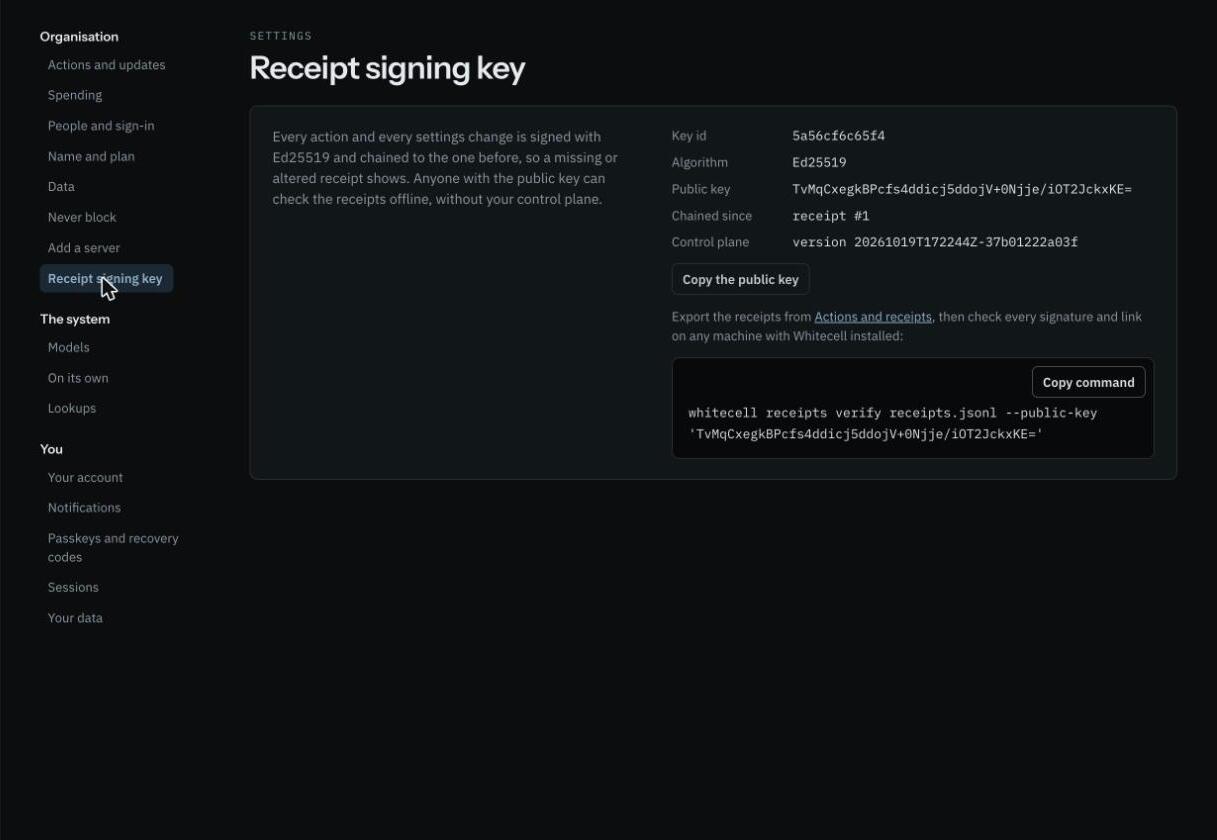
Run it on any machine with Whitecell installed. Every server you added has the whitecell command.
whitecell receipts verify receipts.jsonl --public-key '<the public key from Settings>'
# example output; your counts and key id differ
receipts: 1200 rows, seq 1 to 1200
anchor: seq 1 starts the chain (prev null)
ed25519: 1200 rows, 1200 valid (key 0123456789ab)
head: seq 1200, the last row here
OK: every signature and every link holds
It checks every signature, every link and every gap, and prints each break it finds. It exits 0 only when every receipt was checked and holds. It exits 1 on a failure, on an empty file, or on receipts signed before the switch to Ed25519, which only your control plane can check. It exits 2 when the command itself is wrong. --public-key also takes a PEM file. An export that starts partway along the chain is accepted, and its first link is printed so you can compare it with an earlier copy.
Put back a quarantined file
A quarantine moves one file out of reach on the server and keeps it. The file must sit under a declared web root, a directory a service writes, a cron directory or the systemd unit directory, never a system tree or Whitecell’s own files. The agent may name only a path tied to its own case’s hits, at most three per case. On the server the copy is kept under /var/lib/whitecell/quarantine/, unreadable, with its owner, mode and times recorded.
On the case, the receipts card shows the file, its SHA-256 and its size: “Moved aside on the server and kept unreadable, with its owner, mode and times recorded, so it can be put back.” To put it back:
- Choose “Restore”.
- Read the question “Restore this file?”. It names the file and the server, and says: “If a file is at that path now, the server refuses. The request is signed onto the record.” Add a comment for the record if you want one.
- Confirm. The card says “Restore asked for. It goes to web-01 with its next report.”, then when it was restored, with a link to its receipts.
Only a person can restore a file; the agent cannot. The server checks the kept copy against its hash before it puts it back.
Related
- Reading a case: what the agent asked for, and why.
- Questions and autonomy: what waits for approval, and the kill switch.
- Security: the threat model and what receipts prove.
- The control plane document in the repository, under “The catalogue”, “Policy” and “Receipts”.