The Exceptions page
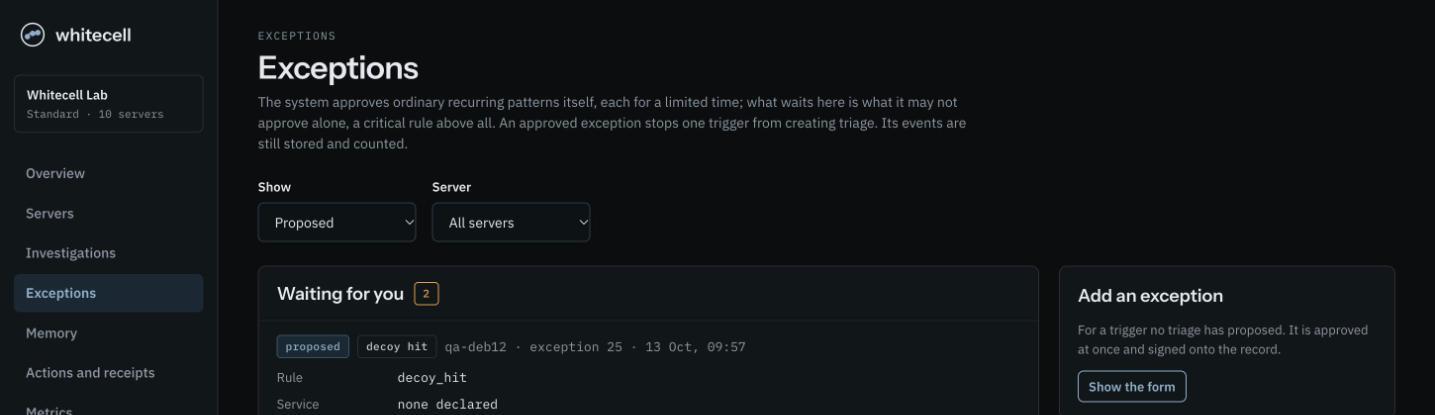
Open Exceptions in the console’s sidebar. The page explains itself: “The system approves ordinary recurring patterns itself, each for a limited time; what waits here is what it may not approve alone, a critical rule above all. An approved exception stops one trigger from creating triage. Its events are still stored and counted.”
Two filters sit above the list. Show picks Proposed (the default), Approved, Expired, Suspended, Declined or All. Server narrows the list to one server, and then says how many more wait on the others. Proposals come in two cards: “Waiting for you” holds what only a person may decide, and “The system will decide” holds the ones it settles itself. The “Add an exception” card sits beside them.
Each proposal shows the trigger read into parts (Rule, Service, Subject), how often its triage saw it, and the agent’s reason. A line says who proposed it, from which case, and why it waits, such as “Waiting for you because this kind is never tolerated automatically.” The agent’s reason is the model’s text: it is shown, never acted on.
What an exception is
A trigger is something a rule fired on, named by a key of five fields: server, kind, rule, service and subject. The subject is folded so that the same thing recurring is one key. A file written is named by its directory, a connection by its network and port, and runs of digits and hex become *. A plugin update that writes forty files is one key. The console’s own example:
web-01|rule_hit|webroot-script|webapp|/usr/sbin/php-fpm*.* write /var/www/site/wp-content/plugins/akismet/
Without an exception, a recurring trigger is looked at again on its 1st, 2nd, 4th, 8th and 16th occurrence of each UTC day, and so on. An approved exception stops that one trigger from creating triage. Its events are still stored and counted: each one adds to the exception’s hits and sets when it was last seen. The model never writes the key. It says only whether to propose an exception and why, and the agent takes the key from the case.
The ones the system approves itself
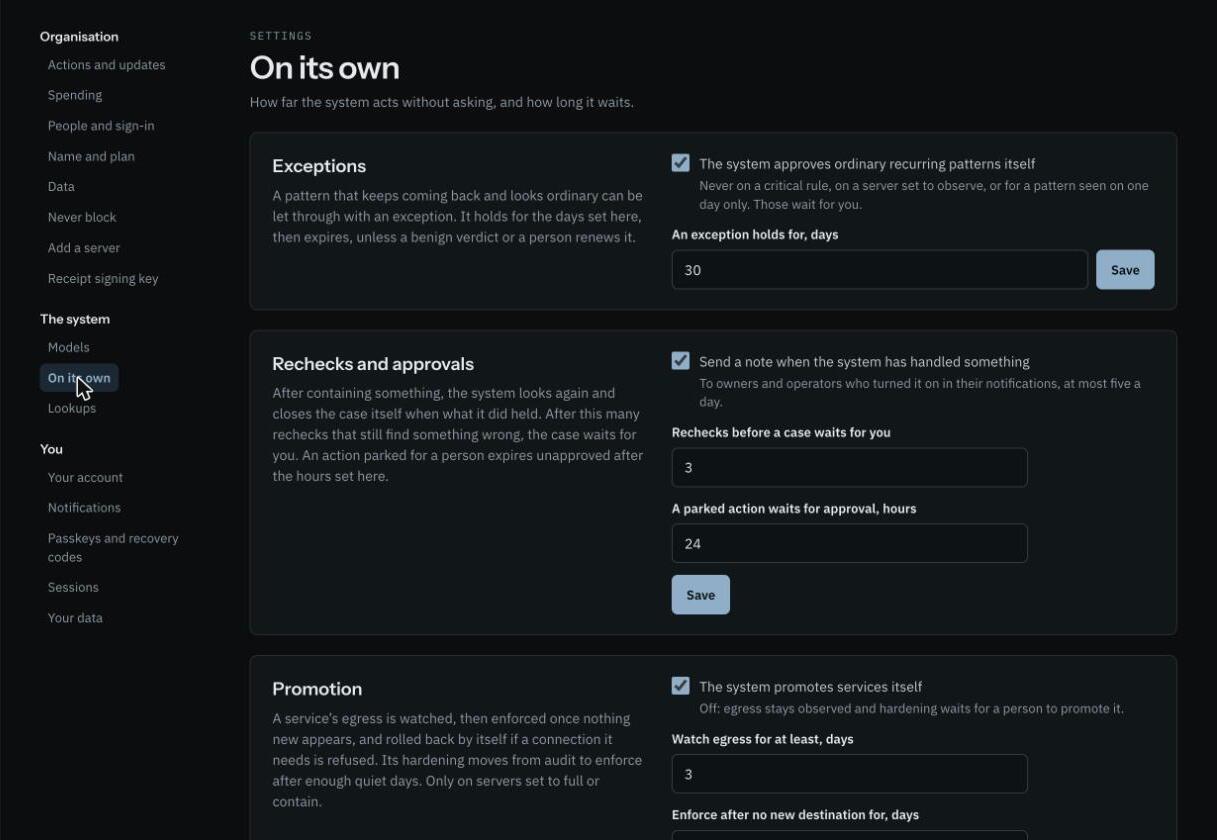
When a triage finds a trigger benign and recurring and proposes an exception, the control plane approves it in the same step. An investigation that found nothing, on a trigger seen on two or more days, may propose one too. Both hold for the number of days set in Settings, On its own, under Exceptions: “An exception holds for, days”, 30 by default, from 7 to 180. The same card has the switch “The system approves ordinary recurring patterns itself”.
Some proposals wait instead. The line under each one says why, in one of these sentences:
- “Waiting for you because it is a critical rule.” The rules web-shell, persistence and kernel. The row carries a “critical rule” chip.
- “Waiting for you because this kind is never tolerated automatically.” A unit failure or an outside address, such as a decoy hit.
- “Waiting for you because this server is on observe.” A server whose autonomy is Observe.
- “Waiting for you because automatic approval is off.” The switch above is cleared.
- “The system will decide itself”, followed by the reason: “it has only been seen one day”, “a chain rule hit this service recently” or “its exception was suspended this week”. The system approves or declines each one at the trigger’s next look, or closes it after seven days without one. You may decide one now.
While a proposal waits, its trigger is looked at once a day, not on every power of two. A proposal never stops anything until it is approved.
Deciding one that waits
A proposal that waits for you also shows in the Overview’s weekly review as a question: “Is this something you or your software set up?”. “Yes, I set this up” approves it, and “No, look into it” declines it and starts an investigation. On the Exceptions page, each choice asks to confirm, takes an optional comment, and is signed onto the record:
- Approve. “This trigger stops creating triage on web-01 until someone lifts the exception. Its events are still stored and counted, and the tripwires still watch it.” An exception a person approves has no expiry.
- Decline and investigate. “The trigger keeps creating triage on its normal schedule, and an investigation of it starts from its last triage. The agent does not propose the exception again.”
- Decline. “The trigger keeps creating triage on its normal schedule, and the agent does not propose it again. You can approve it later.”
Later, an approved exception offers “Renew” (when it has an expiry) and “Lift it”. An expired one offers “Renew” and “Decline”, a suspended one “Approve again” and “Decline”, and a declined one “Approve after all”. A case’s trigger card shows the key’s exception with the same buttons, beside the evidence.
Adding one by hand
The “Add an exception” card is “For a trigger no triage has proposed, or one that keeps coming back as suspicious. It is approved at once and signed onto the record.” Choose “Show the form”, then fill in three fields:
- Server: the server the trigger fires on.
- Trigger key: “server|kind|rule|service|subject, copied from a triage.”
- Reason: “Why this is normal. Kept with the exception and its receipt.”
Choose “Add exception”. Copy the key rather than typing it: the console warns that “a key that differs by one character matches nothing”. The easy way is the case itself, where “Benign and recurring? Add an exception for this trigger” opens this form with the key filled in. The kinds that create triage are rule hit, unit failed, decoy hit, agent probe, CrowdSec alert and request probe. A key that already has a proposed or approved exception is refused, and the refusal names it.
An exploitation never recurs, so no exception goes on its own key. It is tolerated by an exception on the hit that opened it, which its case links to as “Add an exception for the hit that opened it”. Such an exception tolerates only a chain that did nothing beyond that opening hit, such as PHP’s mail() starting a shell. A chain that went further is judged hit by hit, and one that began with a crash cannot be tolerated at all.
Tripwires
An approved exception is still watched. Two tripwires make the system look at its trigger again:
- Rate. Today’s count passes the larger of 20 and five times the trigger’s mean daily count over the 7 days before. At most once a day.
- Chain. A chain rule (web-shell, exec-tmp, sudo or persistence) fired on the same service in the last 24 hours. At most once in 24 hours, so the agent reads the tolerated activity next to the chain hit.
A “suspicious” or “compromise” verdict on that look suspends the exception: “Suspended: a tripwire’s triage found the trigger suspicious, so it creates triage again while the system looks into it.” The case it escalated to runs as usual.
How long one holds
- Approved by the system. It holds for the days set, 30 by default, then expires. The first occurrence after that is looked at at once, with what the exception said and how often it held. A benign verdict renews it, and each renewal doubles the time, up to 180 days: 30, 60, 120, 180 with the default.
- Approved by a person. It has no expiry and holds until someone lifts it. The tripwires still watch it.
- Renewed by a person. It holds again for the days set, counted from now.
- A proposal the system would decide. When its trigger has not come back for seven days, the system closes it: “proposed and closed by the system: not seen again for seven days”.
Related
- Reading a case: the trigger card, where a key comes from.
- Questions and autonomy: the weekly review, and the Observe level.
- Actions and receipts: the receipts each decision leaves.
- The control plane document in the repository, under “Exceptions” and “Exploitation chains”.