The Billing page
Billing is the last item in the console’s menu, and only owners see it. Operators and viewers do not.
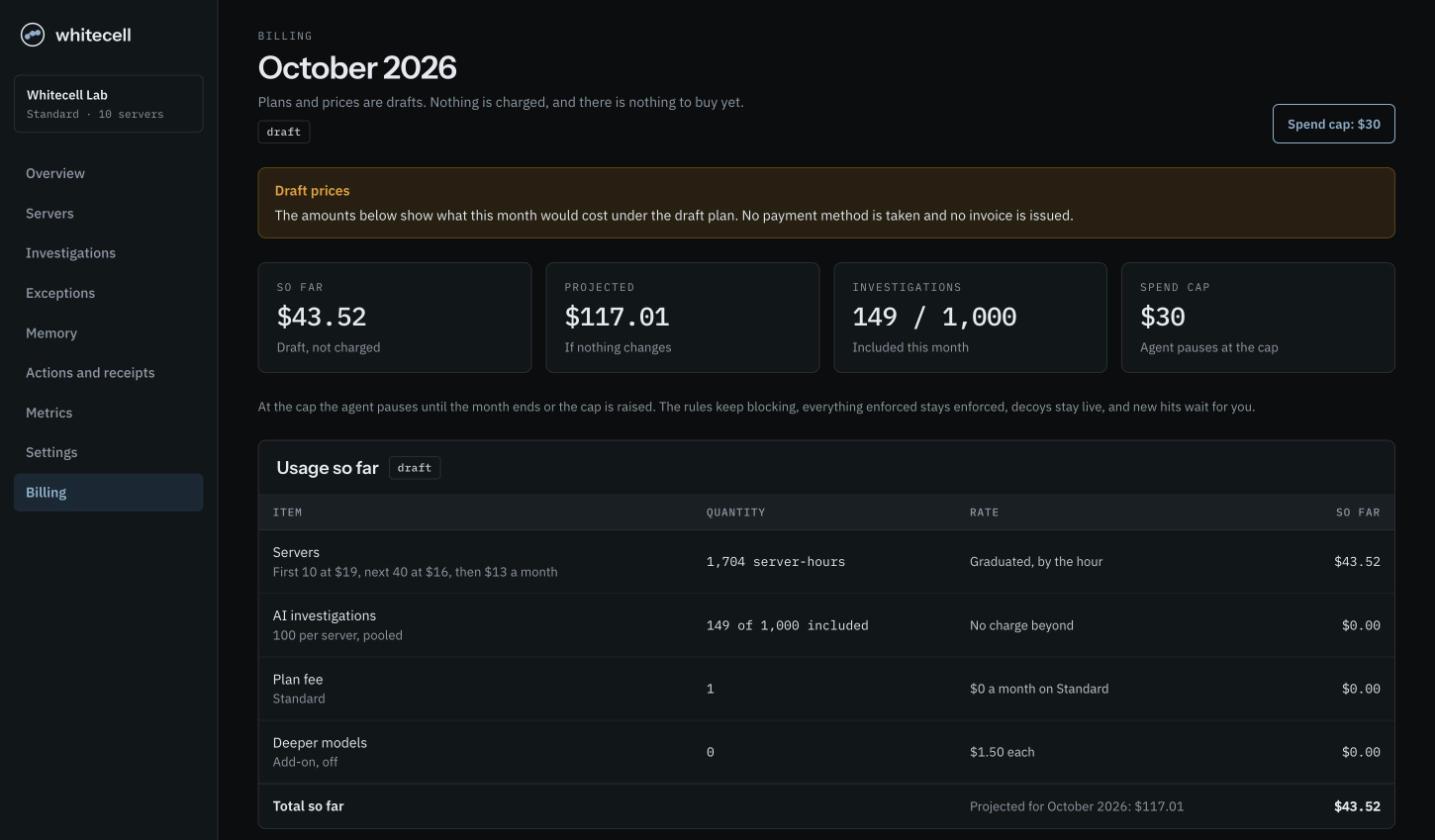
The month is the page’s title, and the button on the right, “Spend cap: $30” in the lab, opens Settings, Spending. The notice “Draft prices” says: “The amounts below show what this month would cost under the draft plan. No payment method is taken and no invoice is issued.” Four tiles follow:
- So far: this month’s amount, “Draft, not charged”.
- Projected: the month’s amount “If nothing changes”.
- Investigations: how many of the month’s included investigations are used.
- Spend cap: your cap, with “Agent pauses at the cap”.
The Usage so far table gives each item’s quantity, rate and amount. In the lab’s draft: Servers, counted in server-hours at “First 10 at $19, next 40 at $16, then $13 a month”, graduated and by the hour; AI investigations, “100 per server, pooled”; a plan fee, “$0 a month on Standard”; and Deeper models, an add-on that is off. The row reads “No charge beyond” because investigations beyond the pool are paid from prepaid credit, as the pricing page says, not invoiced; Deeper models is an add-on that is off and not offered yet. The pricing page is the price list.
Further down, “Measured by your control plane” shows the month’s investigations, model calls, tokens in and out, estimated model spend, server-hours and servers active now, with a table by server. The card “Moving to self-hosting” has “Export receipts (JSONL)”.
Once billing opens, the same page shows the card on file (“Add a card”), a Credit balance that AI investigations are paid from (“each one that finishes is taken off”), “Buy credit” and “Auto top-up”, the latest invoices, and each server in its “Free first week”. None of that is live while prices are drafts.
The price
The pricing page is the only source of prices. Its card says: “$19 per server per month. One plan, billed by the hour. The first week of every server is free, and protection never pauses at a limit.” By the hour that is “$0.026 an hour, never more than $19 a month for one server”, where the hourly figure is the monthly total over 730 hours, an average month.
| Servers in the organisation | Each, a month |
|---|---|
| The 1st to the 10th | $19 |
| The 11th to the 50th | $16 |
| The 51st and on | $13 |
| 200 or more | Talk to us |
- Servers: “Billed by the hour. Add and remove servers freely. A server that is rebuilt counts once.” A server that is off costs nothing, and the price is per server however many sites or hosting accounts it serves.
- Included: “Email support. 30 days of history.”
- No sales call: “No demo, no contract, and no card for the first week. Sales begins at 200 servers.”
The calculator on the pricing page works out a fleet of any size, by the month and by the hour.
The pool of investigations
An investigation, in the pricing page’s words, is “one hit the rules could not settle, taken by the agent from the hit to a verdict, an action within your limits if one is due, and a receipt. A hit the rules settle on their own is not an investigation.”
- The pool: “100 AI investigations a server a month, shared across all your servers.” The lab’s ten servers share 1,000 a month, so one busy server can use what a quiet one does not.
- Beyond the pool: “25 cents an investigation, from prepaid credit. The cap is on by default and you set it. You are told at 80% and again at the limit. One month over the pool a year is free.”
You can watch the pool in these places: the Investigations tile on Billing, the Investigations bar on Settings, Spending (“149 of 1,000 included” in the lab), the counter at the foot of the console’s menu, and the Allowance line on each investigation’s This investigation card.
The spend cap
Settings, Spending holds the cap. Its first line: “The cap covers estimated model spend for investigations in each UTC calendar month. At the cap the agent pauses and you are told. The rules keep blocking, everything enforced stays enforced, decoys stay live, and new hits wait for you.”
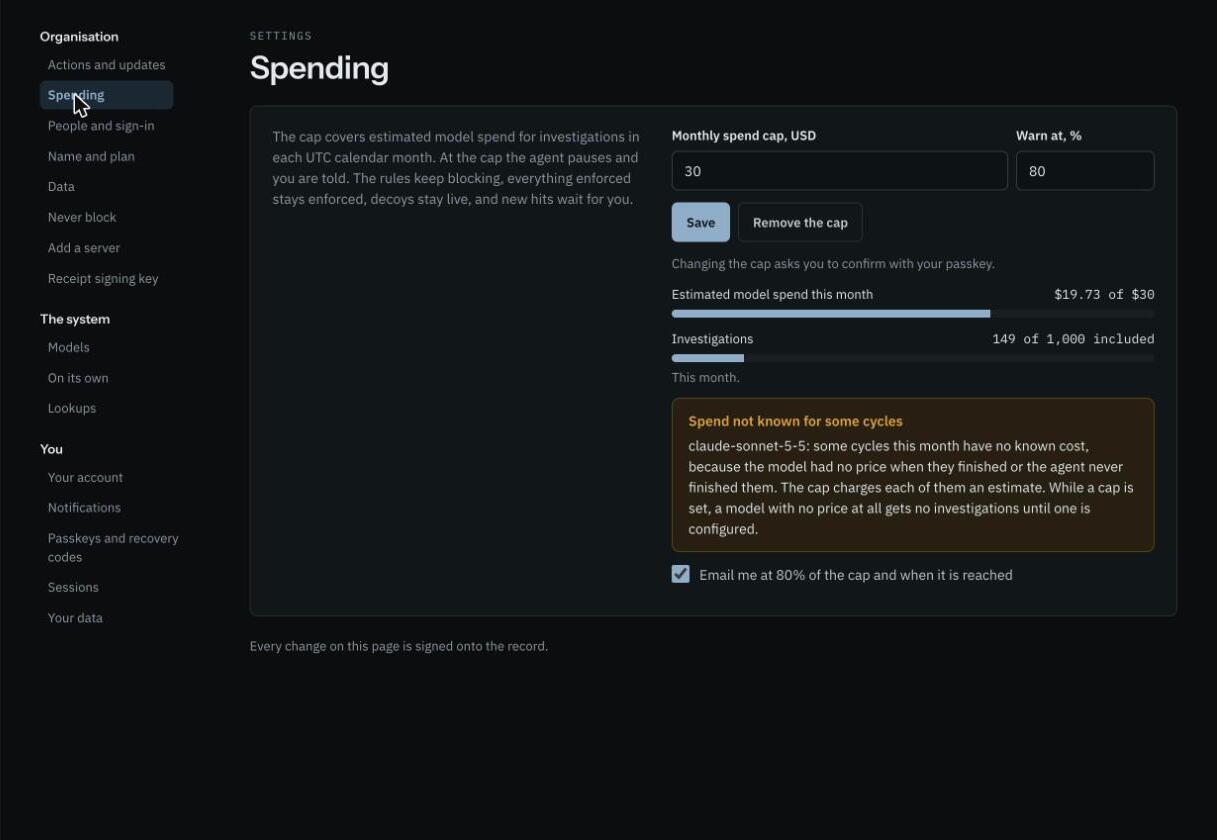
- Monthly spend cap, USD: a whole number of dollars, or dollars and cents.
- Warn at, %: 80 by default. The checkbox “Email me at 80% of the cap and when it is reached” sends you an email at each.
- Who changes it: only an owner, and “Changing the cap asks you to confirm with your passkey.” Others read “Only an owner can change the cap.”
- Remove the cap: asks first, because “Without a cap, investigations continue whatever they cost this month.”
Two bars show where the month stands: “Estimated model spend this month” against the cap, and Investigations against those included. The foot of the console’s menu shows the same two numbers, with the line “At the cap the agent pauses; the rules keep blocking.”
When the cap is reached, Spending shows the notice “The cap is reached”, and the agent stays paused “until the month ends or the cap is raised”. Raise the cap there to start it again, or wait for the next UTC month.
The first week, and day 8
- First week: “Free for every server, with no card.” Every server you add gets its own week. “Nothing is billed for the first week.”
- Day 8 without a card: “the server keeps what it has and the agent stops investigating until a card is added.” As at any limit, protection continues: the rules keep blocking, everything enforced stays enforced, decoys stay live, and new hits wait for you.
- Day 8 with a card: “billing starts at the hour.”
Cancelling
The pricing page says cancelling is “In the console. Billing ends at the hour.” The control is “Close this organisation”, under Settings, People and sign-in, for owners: everyone is signed out at once and the organisation’s data is deleted within 30 days. It also says “A surprise first bill is refunded.”
Running Whitecell yourself is free and gives the same protection. You operate the control plane, the agent and the console, and pay your own model provider. Run the control plane yourself, or leave with everything covers the move.
Related
- Pricing
- The weekly brief, the daily digest and the numbers behind them
- Read an investigation in two minutes
- Run the control plane yourself, or leave with everything
- The models document in the repository: what the model costs, and the spend cap.