Needs you, on the Overview
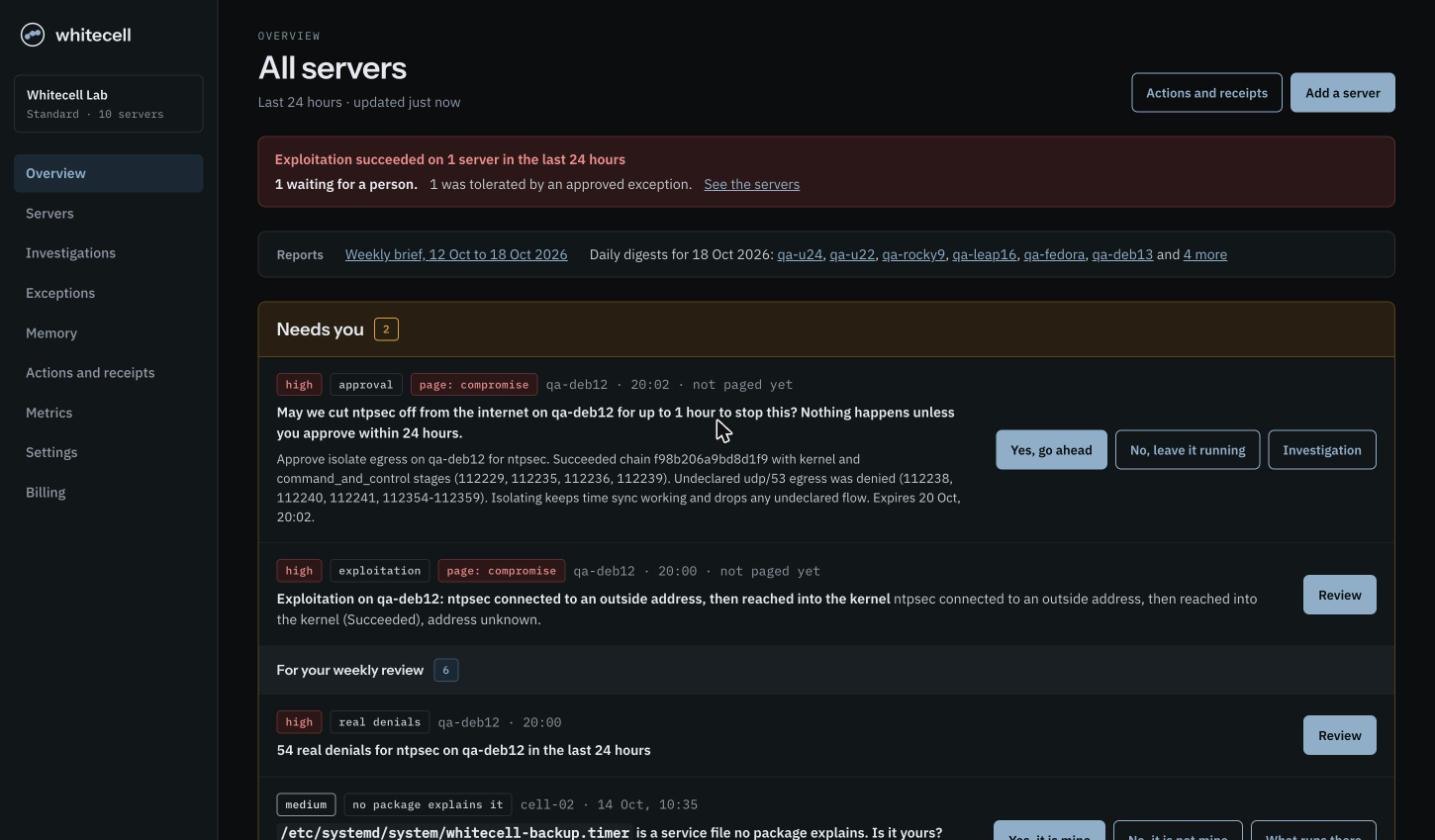
The console’s Overview opens on “All servers”. Under the reports, the “Needs you” card holds what waits for a person, in two groups. The number beside the heading counts the first group only.
- Now. Anything that pages, an action waiting for approval, the spend cap reached, a server that went silent, and a question about a login while the person may still be logged in.
- For your weekly review. Everything else: an exception the system may not approve itself, real denials, a program no package explains, a service quiet enough to promote while promotion is not automatic.
Each row starts with its severity and its kind. A chip such as “page: compromise” means the item pages someone, and the line ends with “not paged yet” or the time it was paged. Pages go by email to owners and operators: a possible compromise, a service down, or a fault in Whitecell itself. Each person chooses what else reaches them in Settings, Notifications. In the Simple view, Home shows the same two groups as cards.
The shape of a question
Most items are questions. Each is one sentence the control plane builds from its own records, never from a model’s text, then a line of detail, then the answers. The approval in the screenshot reads: “May we cut ntpsec off from the internet on qa-deb12 for up to 1 hour to stop this? Nothing happens unless you approve within 24 hours.”
“Yes, go ahead” approves the action, which goes to the server with its next report. “No, leave it running” declines it, and nothing changes on the server. “Investigation” opens the case behind the question. When a question says pause a service, it means the catalogue’s freeze. Pausing actions on a server is something else, described below. Other questions follow the same shape:
- A block, such as “May we block 198.51.100.7 on web-01 for up to 1 hour to stop this?”, with “Yes, block it” and “No, leave it”.
- An address that attacked another of your servers, asking to block it on this one too, with “Yes, block it” and “No, leave it”.
- An exception the system may not approve itself: “Is this something you or your software set up?”, with “Yes, I set this up” and “No, look into it”.
- A destination a service was refused: “Does php-fpm on web-01 need to reach …?”, with “Yes, allow it” and “No, keep it blocked”.
- A program no package explains, ending “Is it yours?”, with “Yes, it is mine” and “No, it is not mine”.
- An update, when updates wait for you: “Update web-01 to the … version?”, with “Yes, update it” and “Not now”.
Owners and operators answer; viewers see the question without the buttons. Every answer is signed onto the record. The weekly summary email also lists anything still waiting for you.
What waits, and for how long
A parked action waits 24 hours by default, then expires unapproved, with a receipt that says so. Change the wait in Settings, On its own, under Rechecks and approvals: “A parked action waits for approval, hours”, from 1 to 168. On a server set to Contain, the blocks and quarantines a case asks for have run already. What parks is the step that would pause, isolate or restart the service, so expiry leaves the safe state.
Approving checks again what may have changed while the action waited. With the kill switch on or the server paused, the approval waits as well. If the target has since been added to Never block, or the action no longer passes its checks, it is refused at approval and never runs. An answer after the expiry is too late.
Deciding from the case
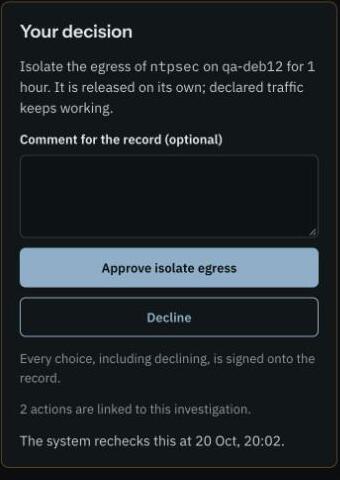
The same request shows on its case, in the “Your decision” card beside the evidence. It says what the action does and how it ends, such as “Isolate the egress of ntpsec on qa-deb12 for 1 hour. It is released on its own; declared traffic keeps working.” Add a comment for the record if you want one, then choose:
- Approve, with the action’s own verb, as “Approve isolate egress”. The console answers “Approved. It goes to web-01 with its next report.”
- Decline. The console answers “Declined. Nothing changes on web-01.”
- Isolate its egress instead, offered for a freeze or a restart. It declines the request and isolates the service’s egress: its undeclared outbound traffic is dropped, and declared traffic keeps working.
The card ends with “Every choice, including declining, is signed onto the record.” and, while one is due, the time of the system’s next recheck of the case.
Autonomy, per server
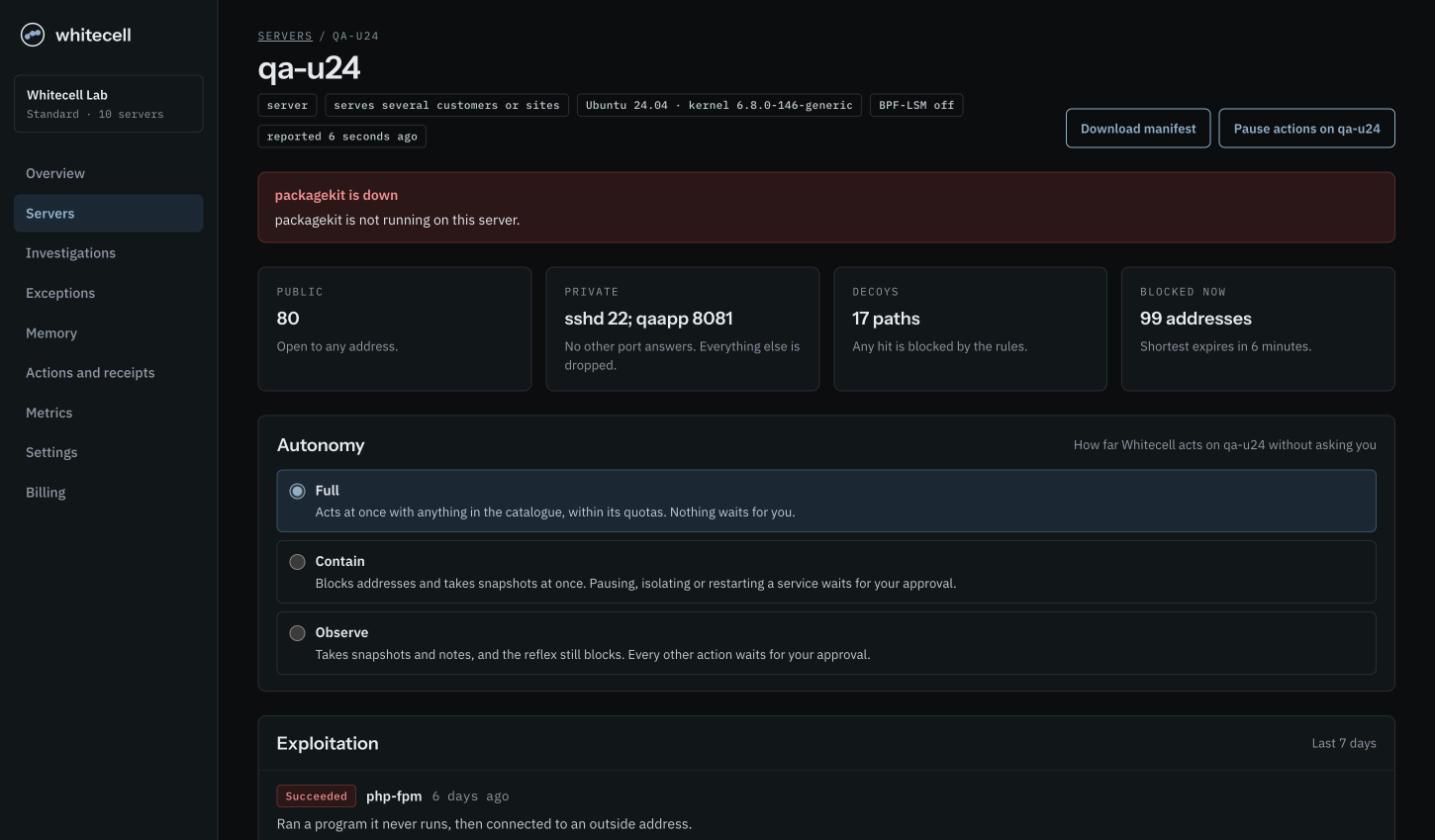
Each server’s page has an Autonomy card: “How far Whitecell acts on web-01 without asking you”. There are three levels. The middle column is the console’s own line. The last column adds what the control plane document lists.
| Level | The console says | In detail |
|---|---|---|
| Full | Acts at once with anything in the catalogue, within its quotas. Nothing waits for you. | A request beyond an hourly quota still waits for approval. |
| Contain | Blocks addresses and takes snapshots at once. Pausing, isolating or restarting a service waits for your approval. | Checking a file, quarantining a file and ending a program a finding named also run at once. Ending a pause or an isolation early waits too. |
| Observe | Takes snapshots and notes, and the reflex still blocks. Every other action waits for your approval. | Checking a file also runs at once. The system’s own promotions wait, and it approves no exception itself. |
A new server starts from who depends on it. A test server, or one that serves one customer, starts at Full. A server that serves several customers or sites starts at Contain. Three things never follow autonomy. The rules’ blocks of decoy hits, brute force and scanners run on every level. Autonomy never parks a person’s own action. Whitecell’s updates follow the Updates setting.
To change the level, choose it. The console asks first, as “Set web-01 to contain?”, and adds “Actions already waiting for approval keep waiting. The change is signed onto the record.” Owners and operators set the autonomy, and the change asks for a passkey confirmation.
Pause actions on one server
“Pause actions on web-01”, at the top of the server’s page, is the emergency stop for one server. The console asks first: “Nothing is sent to this server while it is paused. Rules and the agent keep deciding and recording, and approvals for it wait.” Pausing never asks for a passkey. Resuming does, and then “Queued actions for this server are sent with its next report.” While the server is paused, its page carries a notice saying who paused it and when.
The kill switch
Settings, Actions and updates holds the switch for every server at once: “Stops every action on every server at once. Rules and the agent keep recording what they would have done, so you can see what you missed.” While it reads “Actions are on. Whitecell may act on your servers.”, the button is “Stop all actions”. The console asks first: “Nothing more runs on any server until someone turns actions back on, which needs a passkey confirmation.”
While actions are stopped, the Overview says “Actions are switched off”, nothing is sent to any server, and approvals wait. When actions come back on, a queued action older than 10 minutes expires instead of running. Each server also has a switch of its own; Stop everything shows both commands.
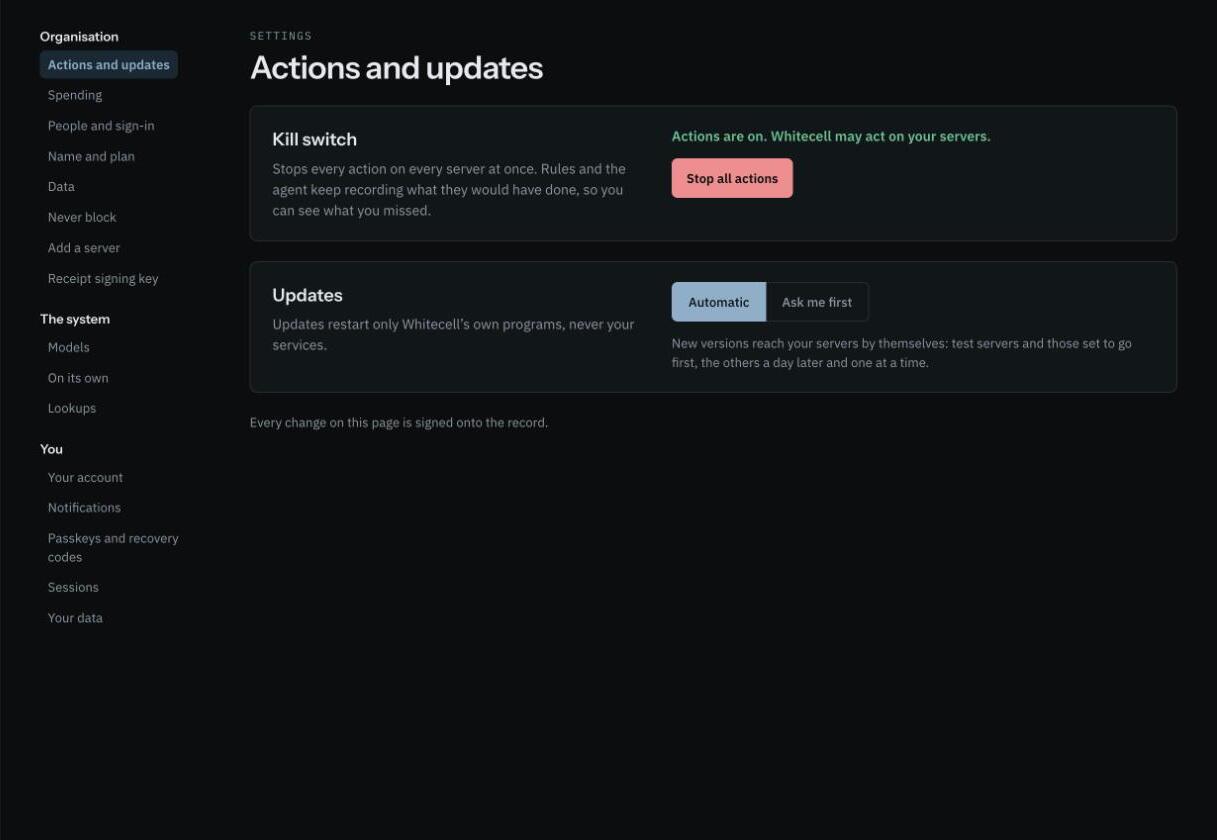
The same page sets Updates. With “Automatic”, “New versions reach your servers by themselves: test servers and those set to go first, the others a day later and one at a time.” “Ask me first” turns each server’s update into a question. Updates restart only Whitecell’s own programs, never your services.
Related
- Reading a case: the evidence behind a question.
- Exceptions: the questions about what is normal.
- Actions and receipts: what each answer leaves on the record.
- The control plane document in the repository, under “Policy”, “Closing cases” and “Pages”.