The Memory page
Open Memory in the console’s menu. The line under the title says what it holds: “An address behind a compromise is blocked at first sight on every server, and a pattern that was a compromise is investigated at once wherever it appears again.” The page has two tables, Remembered addresses and Remembered patterns, each with a count beside its heading.
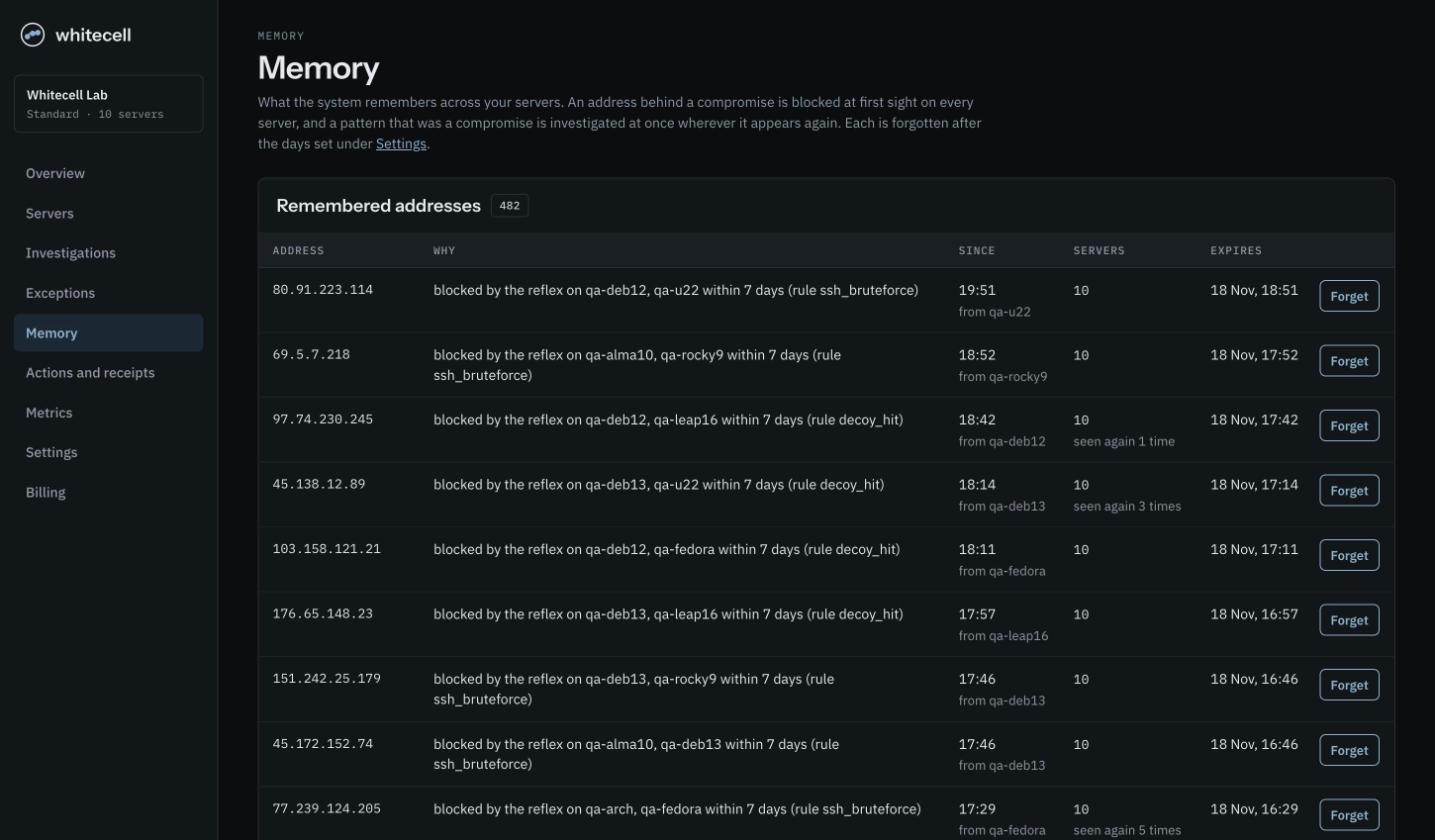
Each row of Remembered addresses gives:
- Address: the address or network, with its kind when a lookup placed it.
- Why: the reason, with a link to the case when an investigation found it.
- Since: when, and the server that saw it first.
- Servers: how many servers block it, and how often it was seen again.
- Expires: when it is forgotten unless it is seen again.
Every member can read it. “Operators and owners keep this list.”
How an address is remembered
The system remembers an address in four ways:
- An investigation finds it behind a compromise and blocks it.
- The rules block it on two of your servers within a week.
- A lookup places an address that met your defences as a malicious scanner, an address behind a proxy or VPN service, or a home connection used as a proxy (see Lookups).
- A person adds it under “Remember an address”.
Remembering an address blocks it at once, for 24 hours, on every other server that has reported. After that, while it is remembered, the rules block it for 24 hours the moment it shows up on any server, whatever it does there. “A server where it is never-blocked is left out.” Each block goes through the same policy and quotas as any other action and gets its own receipt. On the lab’s control plane on 19 Oct 2026, such a block ran a median of 5 seconds after it was requested.
On a server set to Observe, the block waits for you. The Overview asks a question such as “198.51.100.7 attacked web-02; block it on web-01 too?” with “Yes, block it” and “No, leave it”, and it expires unanswered like any other approval. An address a person adds is blocked on every server whatever its autonomy, because a person decided.
How long, and Forget
An address is remembered for 30 days by default. Settings, On its own, sets it on the Memory card: “Remember an attacking address for, days”, from 1 to 365. When the address is seen again in the last day of its window, the window is extended by the same number of days, at most once a day and never past 180 days from when it was first remembered. When the window ends, the system forgets it, and each block already in place runs out within 24 hours.
To forget one sooner, choose Forget on its row. The dialog says what happens: “The system stops blocking it at first sight. Blocks already in place stay until they expire. It is not remembered again by itself for 7 days.” You confirm with your passkey, because forgetting lowers a protection on every server.
To remember one by hand, fill in “Remember an address” and “Why” at the foot of the table and choose Remember. The dialog says: “It is blocked on every server for 24 hours now, and at first sight for 30 days after that.” A network may be no wider than a /24 (IPv4) or a /48 (IPv6): “the system remembers attackers, not whole providers.” Every change is signed onto the record.
Remembered patterns
When an investigation finds a compromise, the system also remembers the pattern that opened it: the rule, the service and what it touched, without the server’s name. The Remembered patterns table lists each pattern in words, where it came from with a link to the case, how often it was seen again, and when it expires.
While a pattern is remembered, a matching rule hit on any server opens an investigation at once, without a triage, starting from the earlier case’s conclusion. That happens at most once an hour on a server, and stops on a server where such an investigation found nothing, until a new compromise renews the pattern. A pattern outranks an exception the system approved, but not one a person approved.
Patterns are kept for 30 days by default (“Investigate a compromise pattern at once for, days”, on the same card). Clear sends a pattern back to ordinary triage on every server, and it is not remembered again for 7 days.
Decisions about destinations
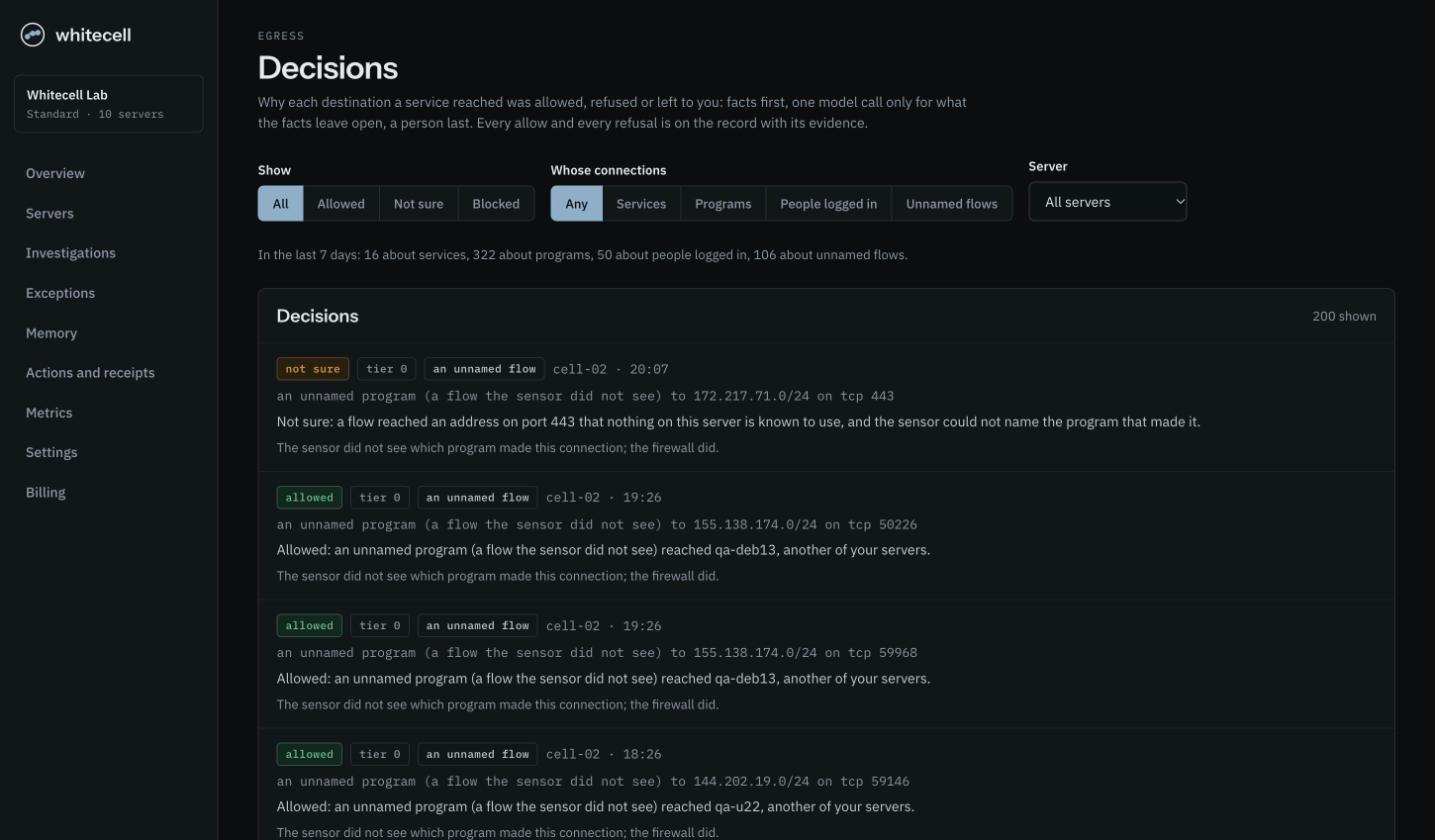
When a service, a program or a person logged in reaches a new destination, the system decides about it. The Decisions page lists every decision, newest first. You reach it from a server’s Egress card (“Every decision about web-01”, or “why?” beside one destination), or from “details” beside a server on the Servers page.
The line under the title is the rule: “Why each destination a service reached was allowed, refused or left to you: facts first, one model call only for what the facts leave open, a person last.”
- Facts first. Without a model, the control plane checks what it already knows: another of your servers, the server itself, its name resolvers, a private address, a published threat list, and the address ranges providers publish for a known purpose, such as a Cloudflare tunnel or package mirrors. An address on a threat list is blocked and investigated.
- One model call. When the facts leave it open, the address is public and lookups are on, the agent makes one call over the facts: who owns the address, its reverse name, what the port usually means. It runs once per destination, never per connection, at most 20 times a server a day, and never at the spend cap. The control plane holds the answer to fixed rules: an allow stands only on a fact that fits the service’s role with no fact against it, and a block only on a fact against it. Anything else stays not sure.
- A person last. What is still not sure becomes a question on the Overview, such as “Does web on web-01 need to reach SendGrid’s mail service (port 443)?” Your answer outranks the system’s, and the system never decides that destination again.
In each row the first chip is the verdict: allowed, not sure or blocked. The second says how it was reached: “tier 0” is from facts the control plane holds, without a model; “tier 1” is one model call over the facts; “by a person” is someone’s answer. “replaced” or “ended” marks a decision no longer in force. A flow the sensor could not name carries the line “The sensor did not see which program made this connection; the firewall did.”
The filters are Show (All, Allowed, Not sure, Blocked), Whose connections (Any, Services, Programs, People logged in, Unnamed flows) and Server. The line above the list counts the last 7 days by whose connection, and the list shows the newest 200.
One decision, opened
Choose a row to open the whole record:
- Why: the sentence, and how it was reached.
- Facts: each fact with its kind, its source and when it was read.
- Expert record: the rule that decided, and for a model call the model’s reasoning in its words.
- In the learned set: for a service, the connections seen, first and last.
- Receipt: when, by whom, until when, and what replaced it.
An allow the system made lapses after 90 days without a connection, and the next connection is decided again. While a service’s egress is enforced, its allows do not lapse. To settle one destination yourself, use Allow or Never on the server’s Egress card. Each asks you to confirm and is signed onto the record.
Lookups
Settings, Lookups, decides how much the system may ask outside services. It is one of the expert pages: if you asked for plain words, choose “Show all settings” to see it.
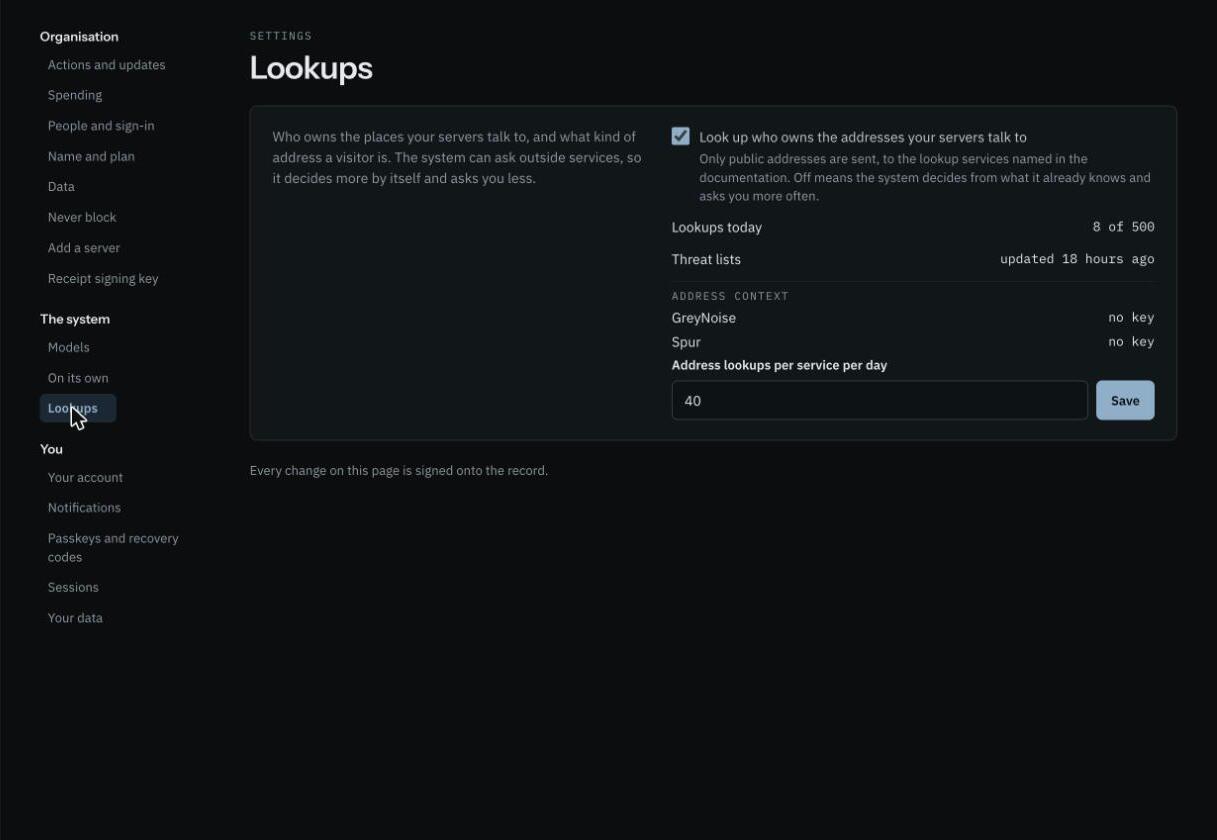
The page has one switch: “Look up who owns the addresses your servers talk to”. Its hint: “Only public addresses are sent, to the lookup services named in the documentation. Off means the system decides from what it already knows and asks you more often.”
- Who owns an address. The owner and country come from Team Cymru’s IP to ASN service over DNS, with the reverse name, and are kept for seven days. At most 500 addresses a UTC day are looked up, counted under “Lookups today”.
- Threat lists. Three published lists, abuse.ch’s Feodo Tracker and ThreatFox and Spamhaus DROP, are fetched about once a day and consulted even with the switch off.
- Address context. GreyNoise and Spur say what kind of address a visitor is, for addresses that met your defences. Each needs a key on the control plane, and “no key” means that service is never asked. The managed console has no field for a key yet, so both rows read “no key” until it does. “Address lookups per service per day” caps each service, 40 by default. A kind changes how long a block lasts and whether the fleet remembers the address, never whether something is blocked.
Only the address leaves, never a server’s name, a service or your organisation. With the switch off, every outside lookup stops, and so does the model call about destinations, so more comes to you as questions. Every change on the page is signed onto the record.
Related
- Tell it what is normal, once
- When it asks, and how far it acts on its own
- Every action, signed, and how to check it yourself
- What leaves your server
- The control plane document in the repository: “Memory”, “Decisions about addresses” and “Inbound categories”.